Markdown in PyMuPDF 1.28
June 29, 2026
The latest release of PyMuPDF 1.28 introduces a coordinated set of improvements that significantly expand its document-processing capabilities.
Headline features include making Markdown files a first class document in PyMuPDF and direct Office to Markdown support.
These enhancements unlock new workflows across all downstream tools - from PDF generation from Markdown to improved document analysis.
Markdown Becomes a First‑Class Citizen
For the first time, PyMuPDF can open, parse, render, and convert Markdown files natively. It is now a fully supported document format, just like PDF, e-books, and all the others.
Key capabilities
• Direct opening of .md files
• Full rendering pipeline support (layout, fonts, images, styling)
• Searchable, selectable text
• Handling of hyperlinks, images, lists and tables
• Conversion to PDF with consistent, high‑quality layout
Why this matters
Markdown has become the default authoring format for developers, technical writers, and documentation systems. Native support means:
• No external converters
• No HTML intermediates
• No loss of structure
• Deterministic, high‑fidelity rendering
PyMuPDF now serves as a universal engine for both traditional documents and modern text‑based formats.
Markdown → PDF with CSS Control
PyMuPDF 1.28 exposes the new Markdown engine through its existing Document.save() method. This means you can now generate PDFs from Markdown text with full control over the PDF appearance, using CSS.
What you can control
• Fonts (including user‑supplied fonts)
• Font sizes, spacing, margins
• Colors
• Table styling
• Code block styling
• Image embedding
• Page layout and typography
This turns PyMuPDF into a lightweight, scriptable PDF generator with nice-looking output.
Example workflow
import pymupdf
md_doc = pymupdf.open("example.md") # open the MD text file
md_doc.save("example.pdf")A simple Markdown file can now become a beautifully styled PDF with just a few lines of Python.
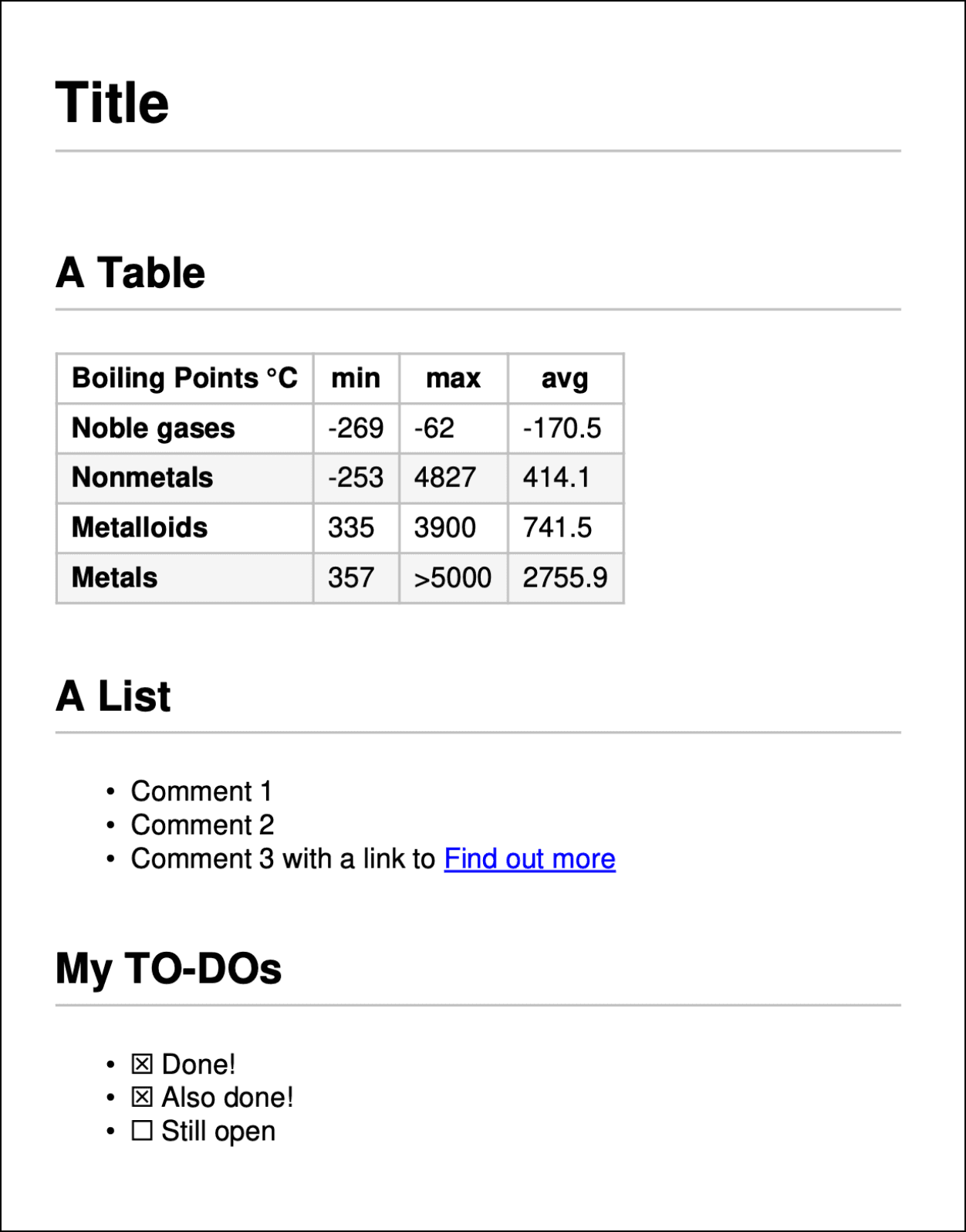
Consider this as the example.md markdown file:
# Title

## A Table

|**Boiling Points °C**|**min**|**max**|**avg**|
|---|---|---|---|
|**Noble gases**|-269|-62|-170.5|
|**Nonmetals**|-253|4827|414.1|
|**Metalloids**|335|3900|741.5|
|**Metals**|357|>5000|2755.9|

## A List

* Comment 1
* Comment 2
* Comment 3 with a link to [Find out more](https://pymupdf.readthedocs.io)

## My TO-DOs

* [x] Done!
* [x] Also done!
* [ ] Still openThe above script will create the following PDF page:
CSS control
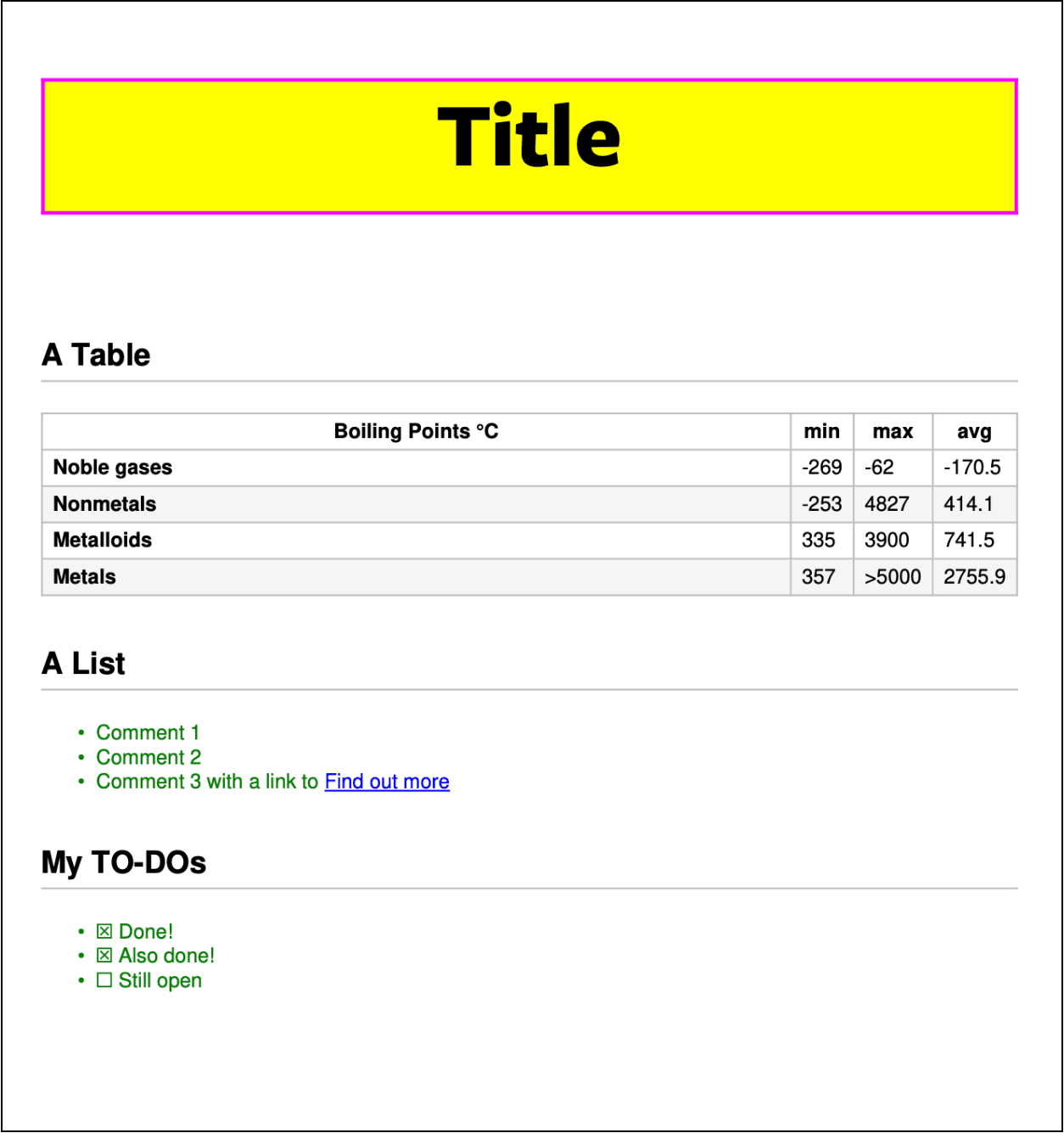
Taking this further we can apply CSS to our Markdown to assign fonts and decorate text.
With no change to our input Markdown consider the following Python script:
import pymupdf

css = """
@font-face {
    font-family: 'FreightSans Bold';
    src: url(FreigSanProBol.ttf);
}

h1 {
    font-size:50px;
    font-family: 'FreightSans Bold';
    border:2px solid #ff00ff;
    background: yellow;
    text-align:center;
}

table {
    width: 100%;
}

ul li {
    color: green;
}
"""

# Build an Archive that points to the folder containing fonts
archive = pymupdf.Archive("fonts")  # the fonts are here
archive.add(".")  # we've stored the image in this script's folder

md_file = "test.md"
md_doc = pymupdf.open(  # open the Markdown document
    md_file,
    archive=archive,  # where to look for resources (fonts, images)
    rect=pymupdf.paper_rect("A4"),  # page dimension ISO A4
)

md_doc.apply_css(css)  # apply our CSS

md_doc.save("example.pdf") # Now save as PDFThis code defines a CSS string which references a font (“FreightSans Bold”). Assuming you have this font in a folder called “fonts” it then creates an archive and passes this through to the Document instance. After this the CSS is applied and the file is converted to PDF format and saved.
The CSS applies some text decoration to the H1 element, resizes the table to fit the available width of the page and then decorates the list items with green text.
Our result now looks like this:
CSS, Custom Element Selectors and Images
We can also control our layout by using custom element selectors in our Markdown input and then using CSS to style those elements directly. For example if we amend the input Markdown to include:
<mytag>Hello World</mytag>We can then easily target this in our CSS with:
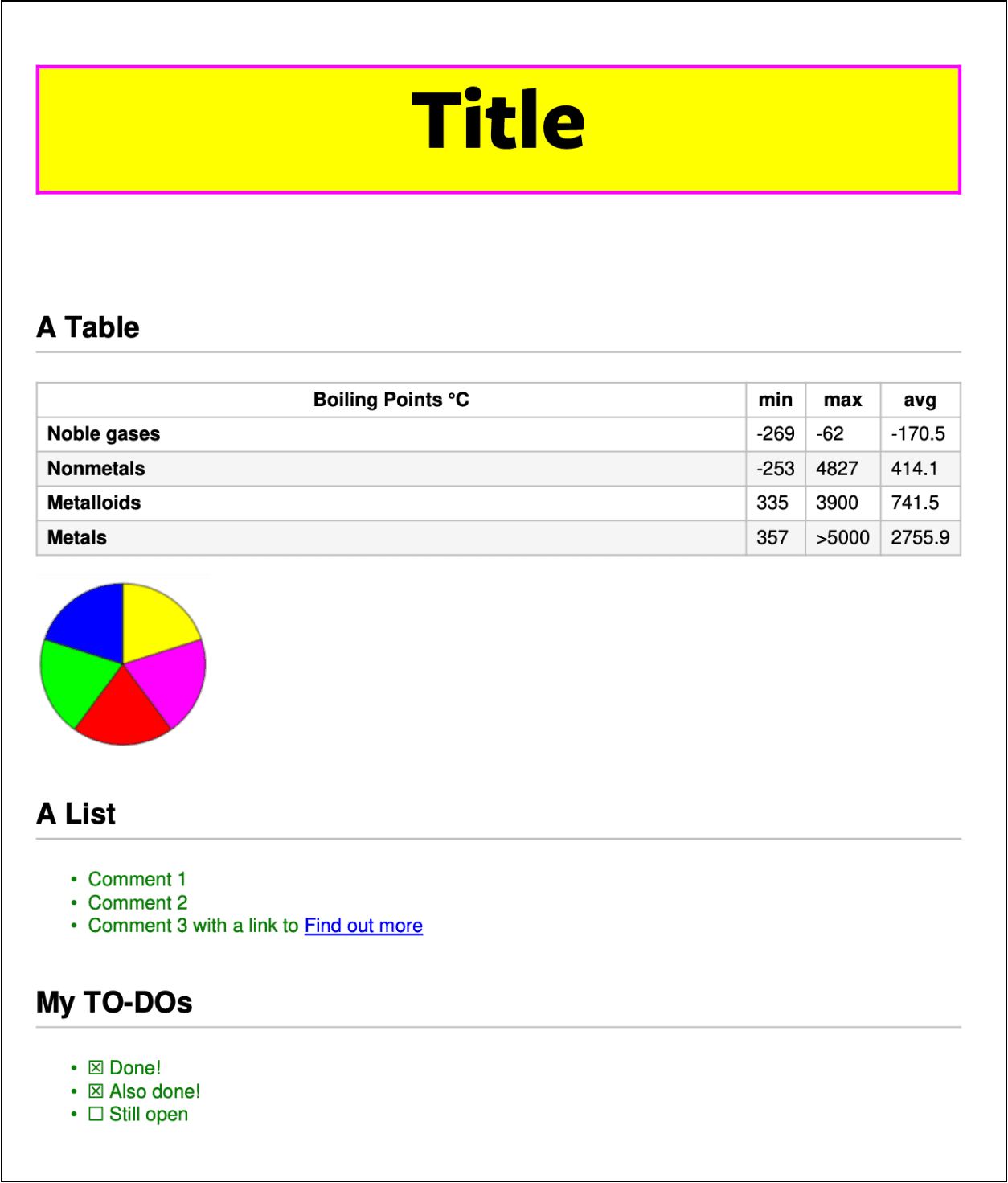
mytag { ... }In this way we can easily place and size images within our Markdown, for example, if we include in our Markdown, the following after the table:
<mytag><img src="pie-chart.png" /></mytag>And if “pie-chart.png” exists in the same folder as our Markdown script ( or in an archive ) then we can target it as follows in our CSS:
mytag img {
    width:100px;
    height:100px;
}The result ensures that we have control over sizing images, without this then the inherent dimensions of the image will be used instead.
With the CSS applied and the Markdown tagged with the custom element selector, we get this resulting output:
Office → Markdown
The other key update with the release of PyMuPDF Pro 1.28 includes support to convert office documents to Markdown. One succinct method call allows us to easily obtain a Markdown representation of any Office document with office_to_markdown().
It’s a simple one-liner with the following:
md = pymupdf.pro.office_to_markdown("my-office-doc.xls")With a binary format every Office document can feel like a black box. Conversion to Markdown strips that away and gives you the raw content.
Why this matters
- Readable by anything. A text editor, a terminal, an AI model. No app required, no rendering surprises.
- Tiny and fast. Large Word documents can become a few KB of plain text. Easier to store, sync, and search.
- Diffable. Git can actually show you what changed in a document, line by line, instead of "binary file modified."
- AI-native. LLMs read and write Markdown fluently. It's the format your tools are already speaking.
- Portable across everything. Drop it into a wiki, a static site, a README, a chat window.
- No vendor lock-in. Your content isn't hostage to a license, an app version, or a proprietary format.
Essentially, now with the new version of PyMuPDF Pro, the ease of Office file conversion to Markdown frees your content for downstream pipelines.
Conclusion
PyMuPDF 1.28 is a significant update, many months in the making and built for the AI era. Markdown is already the native language of LLMs and RAG pipelines, and PyMuPDF now speaks it fluently in both directions: ingesting it as a first-class format, and extracting clean, structured Markdown that is ready to feed straight into a model. Combined with CSS-controlled PDF generation, this release turns PyMuPDF into one of the most capable document toolkits for building modern, AI-powered applications.
Discuss This Article with the Community
Have a question, a different approach, or something you built after reading this? Share it on the forum or join the Discord, we'd love to hear from you.