Know Which Evidence Came from OCR
November 13, 2026

Not all text in a PDF is equally reliable. Tell born-digital text from OCR text, and flag OCR evidence for review.
Many business PDFs are a mix. An annual report is born-digital, but its signed auditor's statement is a scan. A contract is typed, but its signature pages and amendments were scanned. A loan file is mostly scans that a scanner already ran through OCR.
For grounding, this matters. Born-digital text is exactly what the author wrote. OCR text is a machine's reading of an image: usually right, but it can join words, drop a decimal point or read 8 as 3. When an AI answer cites a figure, the reviewer should know whether the evidence is the document's own text or an OCR reading of a scan, and should check the second kind against the image.
A PDF can hold text in three ways, and PyMuPDF can tell them apart:
- Native text: visible text written into the PDF by the application that created it.
- An OCR text layer: invisible text placed over a scanned image, usually by a scanner or an OCR tool, so the scan becomes searchable. It looks like native text to most tools, including LLMs that read the PDF.
- No text at all: an image of text with no text layer. Only OCR at extraction time can read it.
Step 1: Tell native text from an OCR layer
An OCR text layer is drawn with text render mode 3, which makes it invisible: you see the scanned image, and the text sits on top for searching and copying. Page.get_texttrace() reports the render type of every span, and type 3 means invisible. OCR layers also commonly use a placeholder font called GlyphLessFont.
import pymupdf

from grounding import locate

def text_source(page, rect):
    """Where the text in rect comes from: 'native', 'ocr-layer', 'mixed' or 'none'.

    'ocr-layer' is invisible text placed over a scanned image, as produced by
    scanners and OCR tools. It is searchable, but it is only as good as that OCR.
    """
    visible = invisible = 0
    for span in page.get_texttrace():
        if not pymupdf.Rect(span["bbox"]).intersects(rect):
            continue
        n = len(span["chars"])
        if span["type"] == 3:              # text render mode 3: invisible
            invisible += n
        else:
            visible += n
    if visible and invisible:
        return "mixed"
    if invisible:
        return "ocr-layer"
return "native" if visible else "none"Step 2: Find text that only exists in an image
If a quote is not in the text layer, it may still be on the page, inside an image. Page.get_textpage_ocr(full=False) runs OCR only on the page's images and combines the result with the native text, so we can search again. This needs Tesseract installed.
def locate_with_source(page, text, ocr_language="eng"):
    """Locate text and report where the evidence comes from.

    Returns (quads, source). Text that exists only inside an image is found by
    running OCR on the page's images, and reported as 'ocr-runtime'.
    """
    quads = locate(page, text)
    if quads:
        box = pymupdf.Rect()
        for q in quads:
            box |= q.rect
        return quads, text_source(page, box)
    tp = page.get_textpage_ocr(full=False, dpi=300, language=ocr_language)
    quads = page.search_for(" ".join(text.split()), quads=True, textpage=tp)
return quads, ("ocr-runtime" if quads else "not-found")locate() is the function from the first article in this series; it is also in the grounding skill's helper script. Running the sample document through it:
doc = pymupdf.open("acme_mixed.pdf")
for page_index, quote in [
    (0, "Net revenue increased 12% to $4.1 billion"),
    (0, "In our opinion, the statements present fairly"),
    (1, "The Board approved a dividend of $1.20 per share"),
    (0, "Revenue in Asia doubled"),
]:
    quads, source = locate_with_source(doc[page_index], quote)
print(page_index + 1, f"{source:13}", quote)Output:
1 native        Net revenue increased 12% to $4.1 billion
1 ocr-runtime   In our opinion, the statements present fairly
2 ocr-layer     The Board approved a dividend of $1.20 per share
1 not-found Revenue in Asia doubledThe revenue figure is native text. The auditor's opinion exists only as an image and was found by OCR. The dividend is in an OCR text layer from a scanner: a citation tool would treat it like any other text, so without this check nobody would know it came from a scan. The last quote is not in the document at all.
Step 3: Mark OCR evidence for review
Show the reader the difference. Here native evidence is highlighted in yellow and OCR evidence in orange, and the document is left unchanged:
COLORS = {"native": (1, 1, 0), "ocr-layer": (1, 0.6, 0.2), "ocr-runtime": (1, 0.6, 0.2),
          "mixed": (1, 0.6, 0.2)}

def evidence_image(page, quads, source, margin=24, dpi=150):
    """Render the evidence, highlighted yellow for native text and orange for OCR text."""
    box = pymupdf.Rect()
    for q in quads:
        box |= q.rect
    clip = (box + (-margin, -margin, margin, margin)) & page.rect
    annot = page.add_highlight_annot(quads)
    annot.set_colors(stroke=COLORS.get(source, (1, 1, 0)))
    annot.update()
    pix = page.get_pixmap(clip=clip, dpi=dpi)
    page.delete_annot(annot)
    return pix
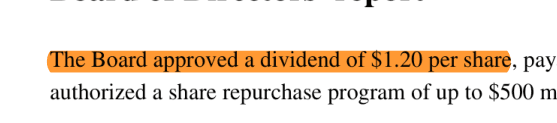
In an answer or an evidence pack, add a short note next to OCR evidence, such as "Read from a scanned image: check against the original." The highlight in the second image ends slightly before the last word. That is typical of OCR layers: their text positions are estimates, so the highlight may not line up exactly with the image.
Step 4: Check a whole document before indexing
Before a document goes into a RAG index or an AI workflow, it helps to know what it contains. This report counts native and OCR-layer characters per page and lists images that have no text over them, which may be scans that need OCR:
def page_report(page):
    """Count native and OCR-layer characters, and find images that hold no text layer."""
    native = ocr_layer = 0
    for span in page.get_texttrace():
        if span["type"] == 3:
            ocr_layer += len(span["chars"])
        else:
            native += len(span["chars"])
    text_area = [pymupdf.Rect(s["bbox"]) for s in page.get_texttrace()]
    untexted_images = []
    for xref, *_ in page.get_images():
        for rect in page.get_image_rects(xref):
            if not any(rect.intersects(t) for t in text_area):
                untexted_images.append(rect)
    return {"page": page.number + 1, "native_chars": native,
"ocr_layer_chars": ocr_layer, "images_without_text": untexted_images}for page in doc:
print(page_report(page))Output:
{'page': 1, 'native_chars': 250, 'ocr_layer_chars': 0, 'images_without_text': [Rect(73.2, 235.0, 476.9, 292.6)]}
{'page': 2, 'native_chars': 0, 'ocr_layer_chars': 146, 'images_without_text': []}Page 1 is born-digital but contains one image with no text: the scanned auditor's statement. Page 2 is entirely an OCR layer.
With PyMuPDF's Layout pipeline
Document.to_markdown() runs OCR on picture regions automatically when Rapid OCR and/or Tesseract is available, and wraps the result in a marker. If you build RAG chunks from page_boxes, as in the second article of this series, you can flag those chunks as OCR text:
for page_dict in doc.to_markdown(page_chunks=True):
    text = page_dict["text"]
    for box in page_dict["page_boxes"]:
        start, stop = box["pos"]
        if box["class"] == "picture" and "Start of picture text" in text[start:stop]:
print("OCR text from a picture:", page_dict["metadata"]["page_number"], box["bbox"])Text from an existing OCR layer, such as page 2 of the sample, is reported as an ordinary text box. To flag it, run text_source() on the box's bbox.
Limits to know
- OCR at extraction time needs Tesseract and adds processing time.
full=Falselimits it to the page's images. - OCR text comes back as many small pieces, often one quad per word. Merge them into one rectangle for display.
- Invisible text is almost always an OCR layer, but not always: some documents hide other text. Treat ocr-layer as a strong signal, not proof.
- Claude's citations work from the PDF's text layer. Text that exists only in an image cannot be cited by Claude, so the ocr-runtime case applies to quotes from other sources, such as models that read page images.
Why this matters
An evidence trail is only as strong as its weakest source. Marking which evidence came from OCR lets reviewers spend their time where errors are likely, and it keeps a misread scan from being presented with the same confidence as the document's own text. In regulated work, being able to say: "this figure was read from a scanned page and checked by a person" is part of a defensible process.
Next steps
- Get the complete notebook from the PyMuPDF cookbook repository.
- Read the first article in the series: Cite Claude's answers at the exact spot in the PDF.
- See everything on grounding with PyMuPDF | Grounding.
Discuss This Article with the Community
Have a question, a different approach, or something you built after reading this? Share it on the forum or join the Discord, we'd love to hear from you.