Catch Hallucinated Citations
November 11, 2026
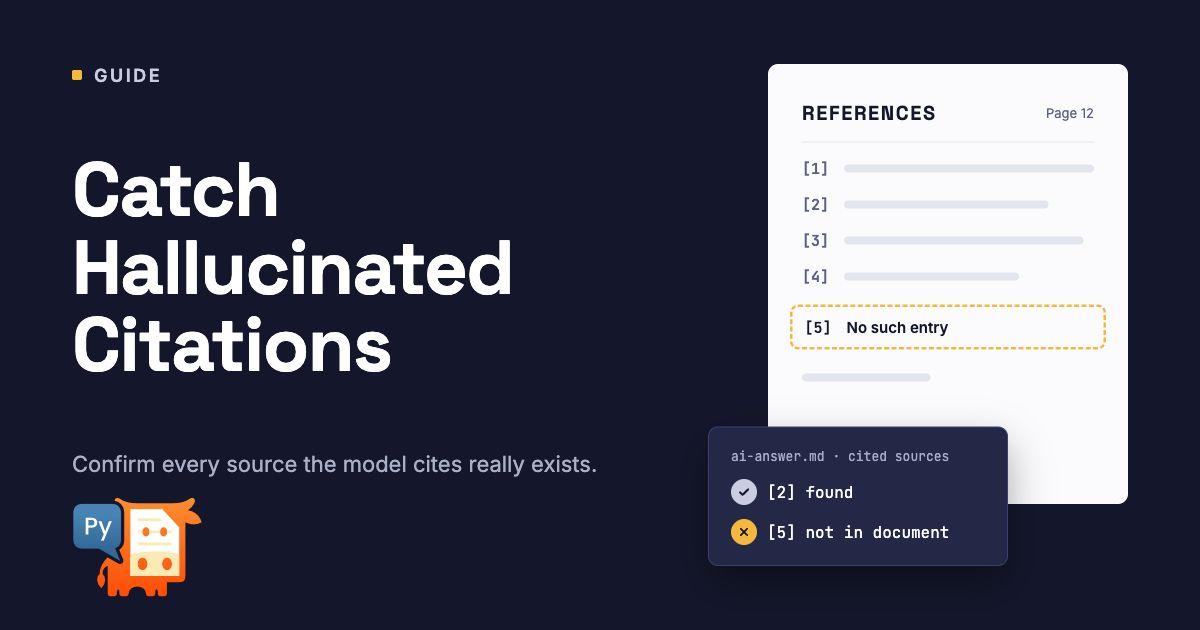
Run every quote an AI answer cites through the source PDF, and count the ones that are not there.
A citation makes an AI answer look trustworthy, which is exactly why a wrong one does damage. Courts have now dealt with more than a thousand cases of AI-fabricated citations in legal filings, and the same failure shows up anywhere AI answers cite documents: a quote that was never written, a number changed inside an otherwise real sentence, the right text attributed to the wrong page, or a document that does not exist.
Checking citations by hand does not scale. With PyMuPDF it is a short script and needs no model: look up each quoted passage in the cited PDF and record what happened. The result is a status for every citation, one number for the whole set, and a PDF report you can send to whoever has to trust the answers.
Step 1: Collect the citations
All the check needs is, for each citation, the document, the page and the quoted text. Store the answers you want to evaluate in a simple JSON file. Here are two of the sample answers:
[
  {
    "id": "q2",
    "question": "What does Acme expect for 2026?",
    "answer": "Acme expects 8% to 12% growth, capital expenditure of $600 million and a new data center in South America.",
    "citations": [
      {
        "doc": "acme_report.pdf",
        "page": 1,
        "quote": "Management expects revenue growth of 8% to 12% in fiscal 2026"
      },
      {
        "doc": "acme_report.pdf",
        "page": 1,
        "quote": "Capital expenditure is expected to reach $600 million"
      },
      {
        "doc": "acme_report.pdf",
        "page": 1,
        "quote": "The company plans to open a data center in South America in 2026"
      }
    ]
  },
  {
    "id": "q5",
    "question": "Who audits Acme?",
    "answer": "Acme is audited by Baker & Lowe LLP.",
    "citations": [
      {
        "doc": "acme_10k.pdf",
        "page": 54,
        "quote": "Baker & Lowe LLP has served as the company's auditor since 2011"
      }
    ]
  }
]The q2 answer adds a growth figure the report does not contain and a data center it never mentions. The q5 answer cites a document that was never provided.
Citations from Claude's Citations API convert directly:
def from_claude(response, names):
    """Claude page_location citations as {doc, page, quote}; names lists the PDFs in the order sent."""
    return [{"doc": names[c.document_index], "page": c.start_page_number, "quote": c.cited_text}
            for b in response.content if b.type == "text"
for c in (b.citations or []) if c.type == "page_location"]Claude extracts cited_text from the document itself, so these citations should almost always verify; running them through the check confirms the page and gives you coordinates. The check matters most where the model writes the quote itself: prompt-based citations from any model, agent outputs, and drafted documents such as briefs and reports.
Step 2: Check each citation
A citation is verified when the quote is found on the page it cites. If the quote is in the document but on another page, it is a wrong page: the text is real, the pointer is not. Quotes are located with the locate() function from the first article in this series, which ignores line breaks, hyphenation, case and punctuation.
import csv
import difflib
import json
import os
import re

import pymupdf

from grounding import locate

def check_citation(docs, cit, close=0.7):
    """Classify one citation: verified, wrong page, close match, not found or missing document."""
    row = dict(cit)
    doc = docs.get(cit["doc"])
    if doc is None:
        return {**row, "status": "missing document"}
    cited = doc[cit["page"] - 1] if 1 <= cit["page"] <= doc.page_count else None
    if cited is not None and locate(cited, cit["quote"]):
        return {**row, "status": "verified", "found_page": cit["page"]}
    for page in doc:
        if page is not cited and locate(page, cit["quote"]):
            return {**row, "status": "wrong page", "found_page": page.number + 1}
    ratio, pno, passage = closest_passage(doc, cit["quote"])
    row.update(similarity=round(ratio, 2), closest=passage, closest_page=pno)
    if ratio >= close:
        return {**row, "status": "close match", "differences": differences(cit["quote"], passage)}
return {**row, "status": "not found"}Step 3: Tell an altered quote from an invented one
A quote that is not in the document is not always invented. Often the model kept the sentence and changed a number, or reworded it slightly. Those cases need a different response from a quote that has nothing to do with the document, so for every quote that was not found we look for the most similar passage and list the words that differ. A passage that is at least 70% similar is reported as a close match; anything less is not found. Neither counts as verified.
def words(text):
    """Lowercase words without punctuation, for comparing quotes with page text."""
    return [w for w in (re.sub(r"[^\w%$.]", "", t).lower().rstrip(".") for t in text.split()) if w]

def closest_passage(doc, quote):
    """The passage in doc most similar to quote: (similarity 0-1, page number, text)."""
    target = words(quote)
    best = (0.0, None, "")
    for page in doc:
        page_words = page.get_text("words", flags=pymupdf.TEXT_DEHYPHENATE)
        tokens = [w[4] for w in page_words]
        n = len(target)
        for i in range(max(1, len(tokens) - n + 1)):
            window = tokens[i:i + n]
            ratio = difflib.SequenceMatcher(None, target, words(" ".join(window))).ratio()
            if ratio > best[0]:
                best = (ratio, page.number + 1, " ".join(window))
    return best

def differences(quote, passage):
    """Words that differ between a quote and a passage, e.g. ['12% -> 10%']."""
    a, b = words(quote), words(passage)
    if sorted(a) == sorted(b):
        return ["same words, different order"]
    out = []
    for op, i1, i2, j1, j2 in difflib.SequenceMatcher(None, a, b).get_opcodes():
        if op != "equal":
            out.append(f'{" ".join(a[i1:i2]) or "(nothing)"} -> {" ".join(b[j1:j2]) or "(nothing)"}')
return outStep 4: Run the evaluation
answers = json.load(open("answers.json"))
names = {c["doc"] for a in answers for c in a["citations"]}
docs = {name: pymupdf.open(name) for name in names if os.path.exists(name)}
rows = [{"id": a["id"], **check_citation(docs, c)} for a in answers for c in a["citations"]]
for r in rows:
print(f'{r["id"]:3} {r["doc"]:16} p{r["page"]:<3} {r["status"]:16} {r.get("similarity","")} {r.get("differences","")}')q1 acme_report.pdf p1 verified
q1 acme_report.pdf p1 verified
q2 acme_report.pdf p1 close match 0.91 ['12% -> 10%']
q2 acme_report.pdf p1 verified
q2 acme_report.pdf p1 not found 0.31
q3 acme_report.pdf p1 wrong page
q3 acme_report.pdf p2 verified
q3 acme_report.pdf p2 close match 0.89 ['same words, different order']
q4 invoice.pdf p1 verified
q4 invoice.pdf p1 verified
q4 invoice.pdf p1 close match 0.75 ['45 -> 30']
q5 acme_10k.pdf p54 missing documentEvery planted error is caught, and the report says what kind it is. The changed growth range shows up as 12% where the report says 10%, and the payment terms as 45 where the invoice says 30. The inventory quote uses the document's words in a different order. The South America data center has no similar passage at all, and the auditor citation points to a document that was never provided.
Add up the statuses to get one number for the whole set:
STATUSES = ["verified", "wrong page", "close match", "not found", "missing document"]

def summarize(rows):
    """Count citations by status, with the share that could not be found in the source."""
    counts = {s: sum(r["status"] == s for r in rows) for s in STATUSES}
    unsupported = counts["close match"] + counts["not found"] + counts["missing document"]
    return {"citations": len(rows), **counts,
"unsupported_rate": round(unsupported / len(rows), 3) if rows else 0.0}{
"citations": 12,
"verified": 6,
"wrong page": 1,
"close match": 3,
"not found": 1,
"missing document": 1,
"unsupported_rate": 0.417
}Five of twelve citations, 42%, are not supported by the cited documents. Wrong-page citations are counted separately: the quoted text exists, but the reader would not find it where the answer says.
Step 5: Share the result
Write a CSV for spreadsheets and dashboards, and a PDF report for people. The report is built with PyMuPDF's Story, which lays out simple HTML on PDF pages, so no other tool is needed.
def write_csv(rows, path):
"""One line per citation, for spreadsheets and dashboards."""
fields = ["id", "doc", "page", "quote", "status", "found_page",
"similarity", "closest_page", "closest", "differences"]
with open(path, "w", newline="", encoding="utf-8") as f:
w = csv.DictWriter(f, fieldnames=fields, extrasaction="ignore")
w.writeheader()
for r in rows:
w.writerow({**r, "differences": "; ".join(r.get("differences", []))})
COLORS = {"verified": "#1a7f37", "wrong page": "#9a6700", "close match": "#bc4c00",
"not found": "#cf222e", "missing document": "#cf222e"}
def write_report(rows, summary, path, title="Citation check"):
"""A shareable PDF report: summary first, then one row per citation."""
from html import escape
unsupported = summary["citations"] - summary["verified"] - summary["wrong page"]
html = [f"<h2>{escape(title)}</h2>",
f"<p>{summary['citations']} citations checked. "
f"<b>{unsupported} ({summary['unsupported_rate']:.0%}) were not found in the cited documents.</b></p>",
"<p>" + ", ".join(f"{s}: {summary[s]}" for s in STATUSES) + "</p>",
"<table><tr><th>ID</th><th>Cited</th><th>Quote</th><th>Result</th></tr>"]
for r in rows:
if r["status"] == "wrong page":
detail = f"found on page {r['found_page']}"
elif r["status"] == "close match":
detail = (f"closest text, page {r['closest_page']}: "{escape(r['closest'])}" "
f"({escape('; '.join(r['differences']))})")
elif r["status"] == "not found":
detail = f"best match only {r['similarity']:.0%} similar"
else:
detail = ""
html.append(f"<tr><td>{r['id']}</td><td>{escape(r['doc'])}, p. {r['page']}</td>"
f"<td>{escape(r['quote'])}</td>"
f"<td><b style='color:{COLORS[r['status']]}'>{r['status']}</b> {detail}</td></tr>")
html.append("</table>")
css = ("* {font-family: sans-serif; font-size: 9pt;} h2 {font-size: 14pt;}"
"table {border-collapse: collapse;} th, td {border: 0.5px solid #999; padding: 3px; vertical-align: top;}"
"th {background-color: #eee;}")
story = pymupdf.Story(html="".join(html), user_css=css)
writer = pymupdf.DocumentWriter(path)
mediabox = pymupdf.paper_rect("a4")
more = True
while more:
device = writer.begin_page(mediabox)
more, _ = story.place(mediabox + (36, 36, -36, -36))
story.draw(device)
writer.end_page()
writer.close()
summary = summarize(rows)
write_csv(rows, "citation_check.csv")
write_report(rows, summary, "citation_check.pdf")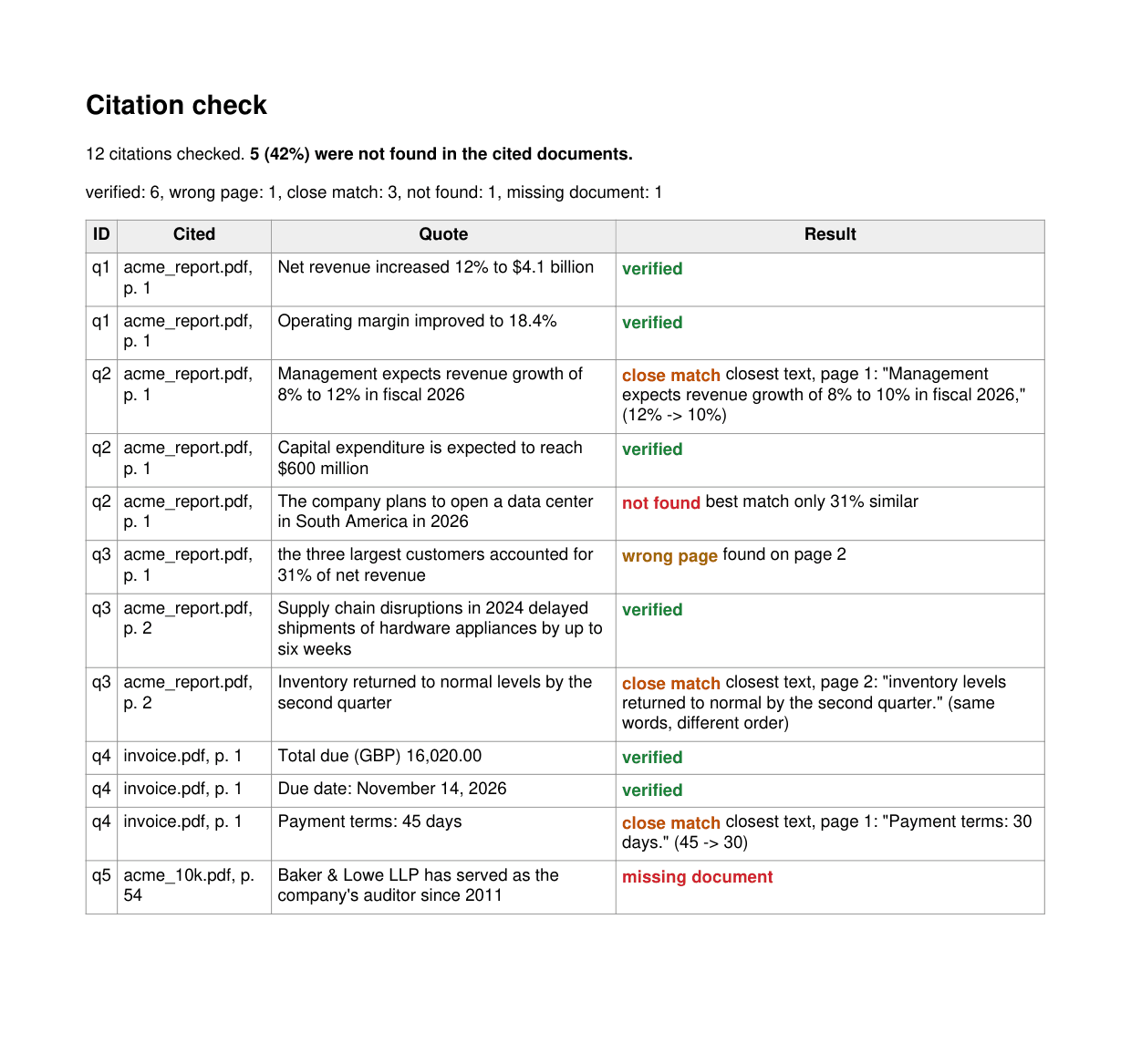
Use it as a test
Because the result is a single number, the check fits into evaluation and Continuous Integration (CI). Run the same question set against two models or two versions of a prompt and compare unsupported_rate, or fail a build when it rises above a limit:
if summary["unsupported_rate"] > 0.02:
raise SystemExit(f"{summary['unsupported_rate']:.0%} of citations were not found in their sources")Limits to know
- This checks quotes. An answer that cites a page without quoting it, or paraphrases, cannot be checked by text matching; ask the model for exact quotes, as shown in the article on grounding answers from any model.
- A verified quote is in the document, but the claim built on it can still be wrong. Checking that a passage supports the claim needs a language model, and is out of scope here.
- The 70% threshold is a starting point. Very short quotes reach it with a single different word, so review close matches rather than treating them as correct.
closest_passage()compares the quote with every passage of the same length in the document. It runs only for quotes that were not found, but on long documents limit it to the cited page and its neighbors.- The PDF needs a text layer. Run OCR on scanned documents first, and see the OCR article in this series for flagging evidence that came from it.
Why this matters
Citation accuracy is usually discussed as a property of a model. In practice it is a property of each answer, and it can be measured: every quote is either in the source or not. A deterministic check that runs in seconds turns "the model cites its sources" into a number you can track, a gate you can enforce, and a report you can hand to a reviewer, a client or an auditor.
Next steps
- Read the first article in the series: Cite Claude's answers at the exact spot in the PDF.
- See everything on grounding with PyMuPDF | Grounding.
Discuss This Article with the Community
Have a question, a different approach, or something you built after reading this? Share it on the forum or join the Discord, we'd love to hear from you.