Build an Evidence Pack for an AI Answer
November 12, 2026
Turn an AI answer and its citations into one PDF that a reviewer, an auditor or a customer can check without any other tools.
Highlights in the source PDF work well when one person checks an answer on screen. Audits, compliance reviews and client deliverables need more: a single file that stands on its own, shows the evidence for every claim, flags anything that could not be verified, and records exactly which document was used.
In this article we build that file with PyMuPDF: an evidence pack. It starts from the located citations of the first article in this series and needs no other libraries.
What goes in the pack
- A cover with the question, how many citations were located, each source file with its SHA-256 fingerprint, and the time the pack was created.
- One entry per claim: the claim, the quoted text, its status, an image of the evidence with the surrounding lines, and the source page.
- Claims whose citation could not be found, marked for review instead of left out.
- The cited source pages at the end, with the evidence highlighted. Clicking an evidence image jumps to its page.
Starting point
We need the located citations from the first article: for each claim, the cited text, the document, the page and the quads. If you use the PyMuPDF grounding skill, ground_citations() and snippet() are in its helper script.
import pymupdf
from grounding import ground_citations      # from the the grounding skill

path = "acme_report.pdf"
doc = pymupdf.open(path)
response = client.messages.create(...)      # Claude with citations enabled
results = ground_citations(response, [doc])The code
pack.py:
import hashlib
import html
from datetime import datetime, timezone

import pymupdf

from grounding import snippet, highlight

def build_evidence_pack(question, results, docs, paths, out_path):
    """Write one PDF that shows the evidence for every claim in an answer.

    results: located citations, as returned by ground_citations()
    docs, paths: the source documents and their file paths, in the same order
    """
    pack = pymupdf.open()
    width, height, margin = 595, 842, 50                  # A4 in points
    page, y = None, height

    def new_page():
        nonlocal page, y
        page, y = pack.new_page(width=width, height=height), margin

    def write(html_text, box_height=400):
        """Write HTML at the cursor and move the cursor below it."""
        nonlocal y
        rect = pymupdf.Rect(margin, y, width - margin, y + box_height)
        spare, _ = page.insert_htmlbox(rect, html_text)
        y += box_height - spare + 6

    # Cover: question, sources with fingerprints, time of creation
    new_page()
    located = sum(1 for r in results if r["quads"])
    write(f"<h2>Evidence pack</h2><p><b>Question:</b> {html.escape(question)}</p>"
          f"<p>{located} of {len(results)} citations located in the source.</p>")
    for path in paths:
        digest = hashlib.sha256(open(path, "rb").read()).hexdigest()
        write(f"<p style='font-size:9px'>Source: {html.escape(path)}<br>SHA-256: <span style='font-family:monospace'>{digest}</span></p>")
    created = datetime.now(timezone.utc).strftime("%Y-%m-%d %H:%M UTC")
    write(f"<p style='font-size:9px'>Created {created}</p>")

    # Render evidence images before highlighting, then add the highlighted source pages
    images = [snippet(docs, r) if r["quads"] else None for r in results]
    highlight(docs, results)
    appended = {}                                          # (doc, page) -> page in the pack

    # One entry per claim
    links = []
    for n, (r, pix) in enumerate(zip(results, images), start=1):
        needed = 120 + (pix.height * 72 / 150 if pix else 0)
        if y + needed > height - margin:
            new_page()
        found = r["quads"] != []
        status = "Found" if found else "<span style='color:#c00'>NOT FOUND, review needed</span>"
        write(f"<p><b>Claim {n}.</b> {html.escape(r['claim'])}<br>"
              f"<span style='font-size:9px'>Cited text: “{html.escape(r['cited_text'].strip())}”<br>"
              f"Status: {status}</span></p>")
        if found:
            scale = min(1, (width - 2 * margin) / (pix.width * 72 / 150))
            w, h = pix.width * 72 / 150 * scale, pix.height * 72 / 150 * scale
            img_rect = pymupdf.Rect(margin, y, margin + w, y + h)
            page.insert_image(img_rect, pixmap=pix)
            y += h + 4
            ref = f"{paths[r['doc']]}, page {r['page'] + 1}"
            write(f"<p style='font-size:9px'>{html.escape(ref)} (click the image to open the highlighted page)</p>", 30)
            links.append((page.number, img_rect, (r["doc"], r["page"])))
        y += 8

    # Append each cited source page once, with its highlights, and link to it
    for doc_index, pno in sorted({key for _, _, key in links}):
        pack.insert_pdf(docs[doc_index], from_page=pno, to_page=pno)
        appended[(doc_index, pno)] = pack.page_count - 1
    for page_number, rect, key in links:
        pack[page_number].insert_link({"kind": pymupdf.LINK_GOTO, "from": rect,
                                       "page": appended[key], "to": pymupdf.Point(0, 0)})

    pack.save(out_path, garbage=3, deflate=True)
return out_pathHow it works
- Text layout.
Page.insert_htmlbox()writes simple HTML into a rectangle and returns the unused height, so thewrite()helper can move a cursor down the page. A new page starts when the next entry would not fit. - Fingerprints. The SHA-256 of each source file ties the pack to the exact version of the document. The hash is set in a monospace font: in a proportional font, letter pairs such as "ff" can be joined into ligatures, and the hash would no longer copy correctly.
- Evidence images.
snippet()renders each cited region with a temporary highlight and the surrounding lines, and leaves the document unchanged. - Status. A citation that was not found is listed in red as "NOT FOUND, review needed". An evidence pack that silently drops unverified claims would defeat its purpose.
- Source pages and links. After the images are rendered,
highlight()adds highlight annotations to the documents in memory.Document.insert_pdf()copies each cited page into the pack once, highlights included, andPage.insert_link()turns each evidence image into a link to that page.
Build the pack
from pack import build_evidence_pack

build_evidence_pack(
    "How did Acme perform in 2025, and what are the risks?",
    results, [doc], [path], "evidence_pack.pdf",
)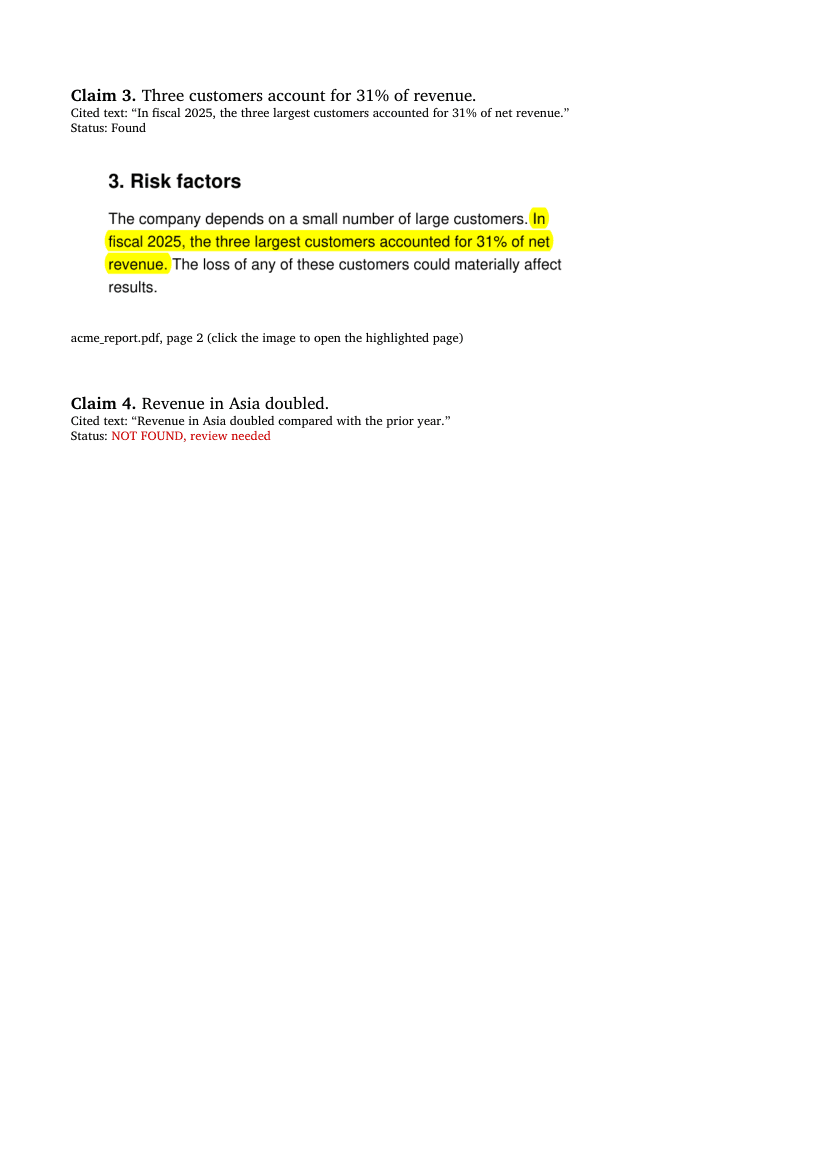
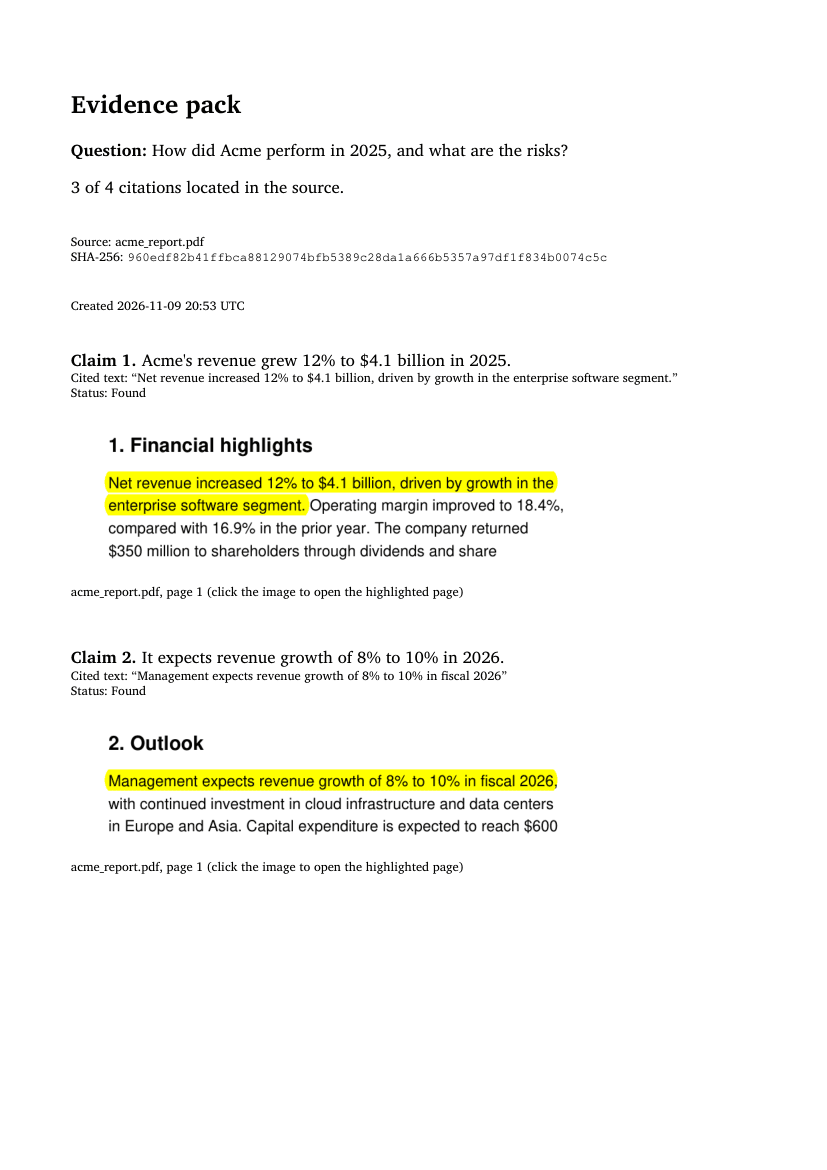
The sample answer has four claims. Three were located; the fourth, "Revenue in Asia doubled", cites text that is not in the report, so the pack flags it for review.
Variations
- Several documents. Pass all documents and paths in the order they were sent to the model. The cover lists each source with its own fingerprint.
- Tables and figures. Use
snippet(docs, r, full_width=True)when the content next to a passage gives it meaning. - The full answer. Add the model's complete answer to the cover, so the pack records what the user saw.
Limits to know
highlight()adds annotations to the source documents in memory. Do not save those documents over the originals.- The timestamp comes from the machine that builds the pack. It is a record, not a trusted timestamp.
- The pack is only as good as the citations: a claim without any citation does not appear in it. A later article in this series covers catching uncited and hallucinated citations.
Why this matters
For regulated work, "the AI said so" is not an answer. An evidence pack turns each AI answer into a record that can be filed, reviewed and checked months later: what was asked, which document version was used, what supports each claim, and what could not be verified. It is built entirely with PyMuPDF, runs on your own infrastructure, and needs no extra model.
Next steps
- Read the first article in the series: Cite Claude's answers at the exact spot in the PDF.
- See everything on grounding with PyMuPDF | Grounding.
Discuss This Article with the Community
Have a question, a different approach, or something you built after reading this? Share it on the forum or join the Discord, we'd love to hear from you.