Chunk PDFs with Provenance
By Jamie Lemon
A RAG pipeline is only as trustworthy as its ability to show where an answer came from. With PyMuPDF's Document.to_chunks(), you can split a PDF into chunks of about 200 words and keep the exact page and rectangle each chunk was read from, in a few lines of Python.
Most chunking pipelines extract plain text and cut it with a text splitter. That works for retrieval, but the positions are gone: when a chunk is retrieved, you can say which file it came from and little else. Keep the bounding boxes and you can highlight the source passage, show a cropped image of it next to the answer, or check a quoted sentence against the page.
This post walks through a companion notebook, which generates a small sample PDF, chunks it at 200 words, saves the chunks with their boxes as JSON, and draws the boxes back onto the page so you can check them.
What to_chunks() gives you
to_chunks() returns a ChunkedDocument: a sequence of Chunk objects you can index, slice and iterate. It is new in PyMuPDF 2.0.
The chunker works from the page layout, not from a flat string. It looks at box boundaries, page breaks, vertical gaps, font changes and headings to decide where one chunk should end and the next begin. A token budget guides the size, but the layout decides the cut.
Each chunk carries its Markdown text and a ChunkMetadata object which supplies metrics data for the sourced text bounding boxes.
Coordinates are in PDF points (72 per inch), measured from the top-left corner of the unrotated page. That is the same system PyMuPDF uses everywhere else, so the boxes plug straight into Page.draw_rect(), Page.get_pixmap(clip=...) or a highlight annotation.
Counting words instead of tokens
to_chunks() sizes chunks in tokens, with a default budget of 400. Asking for 200 words takes one extra argument: tokenizer accepts any callable that takes text and returns an integer. Give it a word counter and max_tokens means words.
def count_words(text: str) -> int:
    """One 'token' per whitespace-separated word."""
return len(text.split())The same parameter also takes a tiktoken encoding name, so switching to real model tokens later is a one-line change. Words are easier to reason about when you are tuning chunk sizes by eye, and they make a 200-word target mean exactly what it says.
Walking through the notebook
A sample PDF to test on
The notebook starts by generating its own test file, so it runs anywhere. It makes 3 Letter-size pages, each with a 16pt heading and six paragraphs of random filler words. A fixed random seed means you get the same document every run. To use your own file, skip that cell and set SOURCE_PDF to its path.
Chunking
The core of the recipe is one call:
with pymupdf.open(path) as doc:
    chunked = doc.to_chunks(
        max_tokens=200,                # 200 words, thanks to the tokenizer
        min_tokens=50,                 # merge tiny fragments into neighbours
        tokenizer=count_words,
        header_footer_mode="exclude",  # keep running headers/footers out
)min_tokens stops the chunker leaving stray two-line fragments, by merging anything smaller into a neighbouring chunk. header_footer_mode="exclude" is the default, spelled out because running headers and page numbers are noise in a retrieval index.
Flattening the results
The notebook then turns each chunk into a plain dictionary, ready for JSON or a vector store:
for chunk in chunked:
    md = chunk.metadata
    records.append({
        "id": chunk.id,
        "text": chunk.text,
        "word_count": count_words(chunk.text),
        "page_start": md.page_start,
        "page_end": md.page_end,
        "section_path": list(md.section_path),
        "bboxes": [
            {"page": p, "rect": [x0, y0, x1, y1]}
            for (p, x0, y0, x1, y1) in md.bboxes
        ],
})A chunk can cover several layout boxes. For highlighting, one rectangle per page is usually more convenient, so a small helper, page_union_boxes(), merges each chunk's boxes page by page using pymupdf.Rect's | operator.
Checking the boxes by eye
Coordinates are easy to get subtly wrong, so the last step draws every chunk's boxes and id onto a copy of the PDF and renders page 1 inline. One detail to watch: the chunk metadata uses 1-based page numbers, while doc[...] is 0-based, so the code indexes doc[b["page"] - 1]. The original PDF is never modified.
Results on the sample PDF
On the 3-page sample, a 200-word limit produced 7 chunks. The largest was 196 words, and every chunk stayed on a single page.
| Chunk | Page | Words | Boxes |
|---|---|---|---|
| c0 | 1 | 196 | 1 |
| c1 | 1 | 92 | 1 |
| c2 | 2 | 159 | 1 |
| c3 | 2 | 169 | 2 |
| c4 | 3 | 172 | 1 |
| c5 | 3 | 156 | 1 |
| c6 | 3 | 57 | 1 |
Note
The chunker split where the paragraphs split, not at word 200. That is why sizes range from 57 to 196 words: it would rather end a chunk early than cut a paragraph in half.
Trying other sizes without re-parsing
Parsing is the slow part of chunking. reassemble_chunks() rebuilds the chunks from the units already parsed, so comparing sizes costs almost nothing:
for size in (100, 200, 300):
resized = chunked.reassemble_chunks(max_tokens=size, min_tokens=size // 4)| Limit (words) | Chunks | Largest chunk (words) |
|---|---|---|
| 100 | 14 | 92 |
| 200 | 7 | 196 |
| 300 | 5 | 288 |
The word-counting tokenizer carries over, so the limits stay in words.
The boxes on the page
Page 1 of the outlined copy, with chunk c0 in red and c1 in blue:
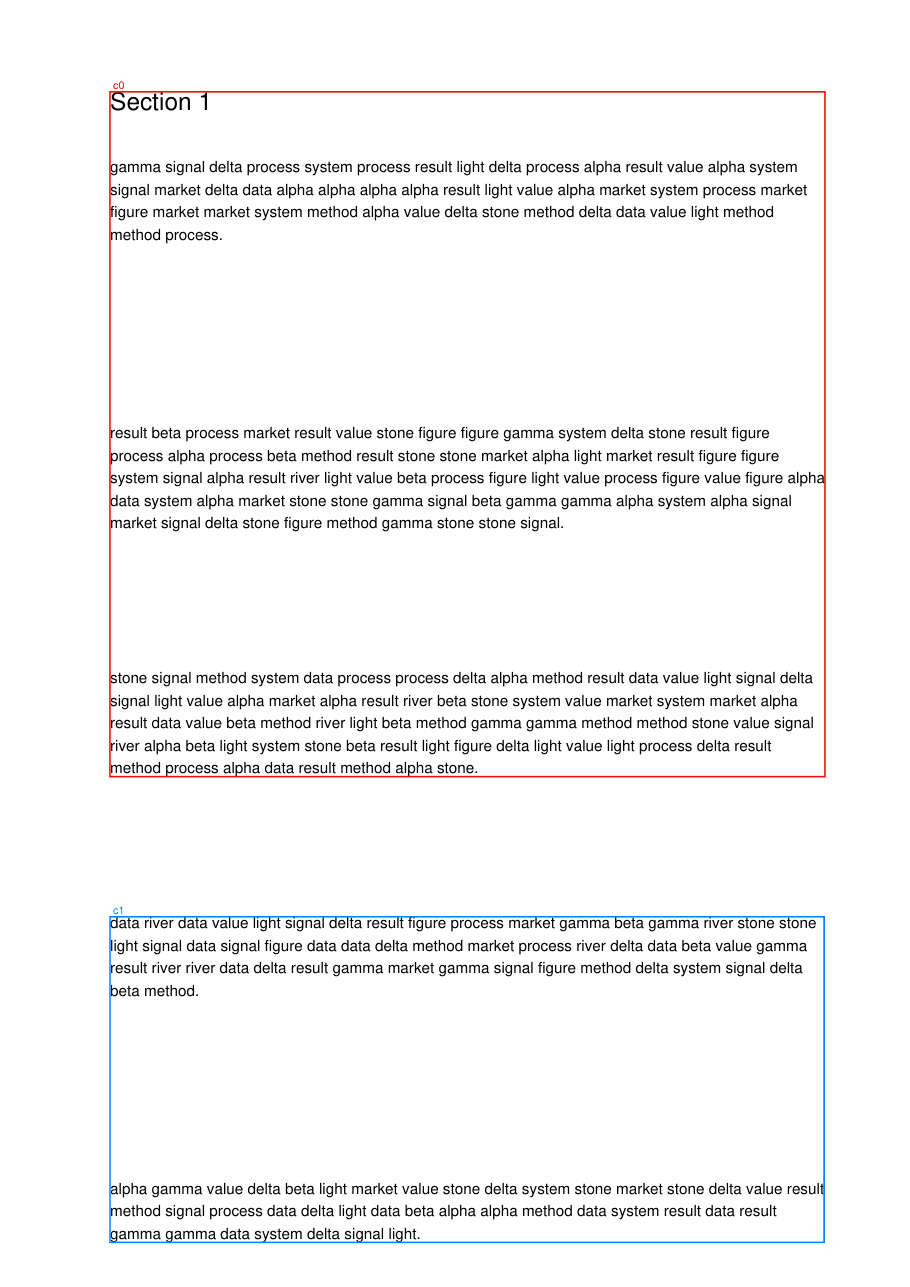
Each outline is a chunk's bounding box from metadata.bboxes, drawn back onto the page. The boxes line up with the text, which confirms the coordinates are being read and indexed correctly.
Things to watch for on real documents
The sample PDF is deliberately easy: one column, no tables, clear gaps between paragraphs. Real documents need a little more care.
- The limit is a ceiling, not a size. Expect chunks anywhere from well under the limit up to it. If you need tighter sizes, lower
min_tokensor adjustbreakpoint_threshold. - Tables can exceed the limit. With the default
table_mode="preserve", a table stays in one chunk even if it is longer than 200 words. Usetable_mode="isolate"to keep tables out of neighbouring chunks instead. - Chunks can span pages. A page break is a strong place to split, not a forced one. Check
page_startandpage_end, or the page number in each box, before assuming one page per chunk. - Boxes are per layout block. A box covers a paragraph, heading or table, not a sentence. To point at an exact sentence inside a retrieved chunk, search for it with
Page.search_for(), limited to that chunk's boxes. - Scanned pages need OCR. PyMuPDF will OCR image-only pages if an OCR engine is installed, and
metadata.ocrtells you when that happened. OCR'd boxes are only as good as the recognition. - Mind the coordinate system. PyMuPDF measures from the top-left; the PDF format itself measures from the bottom-left. If another tool expects PDF-native coordinates, convert with
rect * page.transformation_matrix. To draw on a rendered image, scale bydpi / 72.
Wrapping up
One to_chunks() call with a word-counting tokenizer gives you layout-aware chunks of up to 200 words, each with the page and rectangle it came from. Store the boxes as metadata next to the embeddings, and every retrieved chunk can be traced back to the page.
To run it yourself, install PyMuPDF 2.0 or later (pip install "pymupdf>=2.0"), open the notebook and run it top to bottom. Then point SOURCE_PDF at one of your own documents and compare the chunk sizes and boxes.
Further reading
Document.to_chunks()referenceChunkedDocumentreferenceChunkMetadatafield reference- Get the complete notebook from the PyMuPDF cookbook repository.
- View the cookbook example.
- See everything on grounding with PyMuPDF | Grounding.
Discuss This Article with the Community
Have a question, a different approach, or something you built after reading this? Share it on the forum or join the Discord, we'd love to hear from you.