
Benchmarking PDF Extraction
Higher-quality data for language models
A varied document corpus
370 documents · 8 document business domain types
Unlocking PDF Data for AI
Critical business information is often buried inside PDFs: tax returns, invoices, remittance statements and financial disclosures. For businesses building AI workflows, the goal is to get that information out of PDFs and into an AI model reliably and at scale, so the model's answers are grounded in real company data.
There are two main ways to feed PDF data to an AI:
- Send the PDF directly to the AI. Upload the raw PDF to a vision-capable model and let it read the pages visually.
- Convert the PDF to Markdown first. Use a parser to turn the PDF into Markdown, a lightweight text format that preserves structure such as headings, reading order and tables, then pass that clean text to the AI.
Why Converting to Markdown Beats Direct PDF Input
Sending a raw PDF is convenient, but in dense financial or legal documents, a single missing row or dropped digit can ruin the result. In our testing, raw PDF input failed in predictable ways that converting to Markdown solves:
- Truncated rows. When given raw PDFs, the model often cut off multi-page tables partway through, leaving rows near the end unextracted. Markdown supplies the exact text of every row so nothing is lost.
- Dropped digits. With raw PDFs, the model sometimes dropped repeated digits and could produce numbers that looked plausible but are wrong. Markdown passes the exact digits directly to the model as text.
- Traceable, verifiable answers. Raw PDF input returns values without a reliable link to where they came from. Parsing the PDF first lets you connect each piece of extracted text to its source page, so users can trace any answer back to the original PDF and verify it.
- Lower costs at scale. Converting to Markdown first cuts LLM API costs by about 30%.
Not All Markdown Converters Are Equal: PyMuPDF vs. Docling
These benefits depend on the converter. An AI can't use information that never reaches it, so if a converter scrambles a table, drops a footer or mistakes a block of text for an image, the AI will get the answer wrong.
We compared PyMuPDF with Docling, one of the most popular PDF extraction tools. PyMuPDF produced significantly more accurate Markdown, converted documents 6.6 times faster and had zero parsing failures whereas Docling failed to parse 9 PDFs.
How We Tested
We used ExtractBench, an open benchmark of 370 complex business documents spanning 4,869 pages. Each document comes with a schema, a list of the data points to extract (such as invoice totals, line items or account numbers), and an answer key with the correct values.
We tested every document in three setups. In each one, we gave GPT-6 Luna the same schema and the same prompt, and asked it to fill in the fields. The only difference was what the model received as the document:
- PyMuPDF → Markdown. We converted the PDF to Markdown with PyMuPDF and gave the model that Markdown.
- Docling → Markdown. We converted the PDF to Markdown with Docling and gave the model that Markdown.
- Direct PDF. We gave the model the original PDF, with no conversion step.
ExtractBench then scored each setup's answers against the answer key, field by field. Correct values raise the score; wrong or missing values lower it.
Because the model, prompt and schema never changed, any difference in scores comes from the input. In the two Markdown setups, the model can only extract what the converter captured. If the Markdown dropped a table row, the model couldn't find it. If the Markdown scrambled a table, the model matched numbers to the wrong fields. So the higher a converter's score, the more complete and accurate its Markdown. The Direct PDF setup shows how well the model does reading the PDF on its own, without any conversion.
Why extraction matters
An LLM cannot extract information that never reaches its input. Tax returns, invoices, remittance statements and fund disclosures contain dense tables and numbers. Missing text or a dropped digit can change the result.
Sending a PDF directly to a vision-language model (VLM) is convenient. However, as we discovered in this comparison it used more input tokens and sometimes returned incomplete tables or dropped repeated digits. By converting the PDF to Markdown before the LLM extracts the data this study shows how this approach can be more accurate and less expensive than direct PDF input.
Accurate extraction is also a foundation for grounded answers. When extracted content stays connected to its source pages and locations, users can trace an answer back to the supporting evidence and verify it in the original PDF. Learn more about grounding in document extraction.
Key findings
On ExtractBench, a public benchmark of 370 business documents spanning 4,869 pages, PyMuPDF with RapidOCR achieved an extraction F1 of 85.20%. It came within 1.5 percentage points of sending PDFs directly to Luna (86.74%) and scored about 5 points above Docling (80.38%).
Reported LLM cost was about 30% lower than Direct PDF input, and PDF conversion was 6.6 times faster than Docling. PyMuPDF performed better than Direct PDF input on the medium-length and digitally generated document subsets, with examples below showing advantages on large tables and exact numeric values.
PyMuPDF Results Summary
| Finding | Result |
|---|---|
| Accuracy | 85.20% F1 across 370 documents, 4.8 percentage points above Docling and 1.5 points below direct PDF input. |
| Speed | 2 hours 24 minutes to convert all 370 documents, compared with 15 hours 46 minutes for Docling. |
| Cost | Reported LLM cost of $0.75 versus $1.09 for direct PDF input, with 44% fewer input tokens. |
| Reliability | No parsing failures across 370 documents, compared with 9 for Docling. |
| Large tables | Complete or nearly complete row extraction in the examples below, where direct PDF input returned only part of the table. |
Table 1: PyMuPDF Results Summary
ExtractBench results
The three methods used the same extraction model, GPT-6 Luna, the same schema and the same scoring criteria. PyMuPDF and Docling supplied Markdown. The Direct PDF method supplied the original PDF to Luna.
- The Docling results were measured with Docling 2.130.0
- The PyMuPDF results were measured with PyMuPDF 2.0.0 (includes PyMuPDF4LLM 2.0.0) and RapidOCR 3.9.2.
- F1 measures the final extraction result, including the LLM, rather than parser accuracy alone.
- Tools ran with default settings.
| Metric | PyMuPDF | Docling | Direct PDF |
|---|---|---|---|
| Overall F1 (370 documents) | 85.20% | 80.38% | 86.74% |
| Medium-length F1 (11–50 pages, 98 documents) | 87.00% | 85.08% | 83.74% |
| Repeated complex regions (27 documents) | 82.1 | 55.7 | 78.4 |
| Cross-reference and reconciliation (24 documents) | 83.1 | 57.1 | 79.6 |
| Digitally generated PDFs (133 documents) | 91.4 | 86.1 | 88.6 |
| Conversion time | 2 h 24 min | 15 h 46 min | Not applicable |
| Reported LLM cost | $0.75 | $0.81 | $1.09 |
| Input tokens | 9.3M | 9.9M | 16.5M |
| Parsing failures | 0 | 9 | 1 |
Table 2: ExtractBench results
On documents with repeated complex regions or cross-references, PyMuPDF scored about 26 points above Docling and also outperformed Direct PDF input.
Examples from the benchmark
The examples below come from ExtractBench, with controlled document variations where noted. The comparison figures show the source PDF and the Markdown supplied to the LLM. They illustrate how differences in the input can affect extraction.
1. Extracting long tables
Fund disclosures and check registers can contain hundreds of rows. In these examples, the LLM returned complete or nearly complete tables from PyMuPDF's Markdown. With the same model and direct PDF input, it returned only part of each table.
| Document | Expected rows | PyMuPDF rows (F1) | Docling rows (F1) | Direct PDF rows (F1) |
|---|---|---|---|---|
| Quarterly holdings disclosure (12 pages) | 425 | 425 (100) | 425 (87) | 32 (13) |
| ETF holdings disclosure (23 pages) | 336 | 337 (100) | 336 (30) | 12 (7) |
| County check register (20 pages) | 160 | 160 (100) | 159 (23) | 0 (0) |
| Fund holdings (18 pages) | 766 | 764 (82) | 765 (40) | 46 (11) |
Table 3: Extracting long tables
PyMuPDF also kept more records together in a single Markdown row. In the check-register comparison, it preserved 485 of 486 records this way, versus 366 for Docling. In the fund-holdings comparison, the figures were 695 of 761 versus 518.
Note: These counts describe Markdown row structure, separately from the table above.
2. Keeping text in the model's input
PyMuPDF completed parsing for all 370 documents without a parsing failure. With default settings, Docling sometimes classified text regions as images and replaced them with <\!-- image \--\>, or failed to convert the document. Across 29 affected documents, Docling averaged 19.4 points, compared with about 82 for PyMuPDF.
In the Medicaid remittance statement adjustment page below, PyMuPDF preserved the names, claim numbers, dates and amounts for both claims. Docling replaced the block with an image placeholder, leaving the LLM unable to extract any of the 58 fields. F1: PyMuPDF 98, Direct PDF 90, Docling 0.
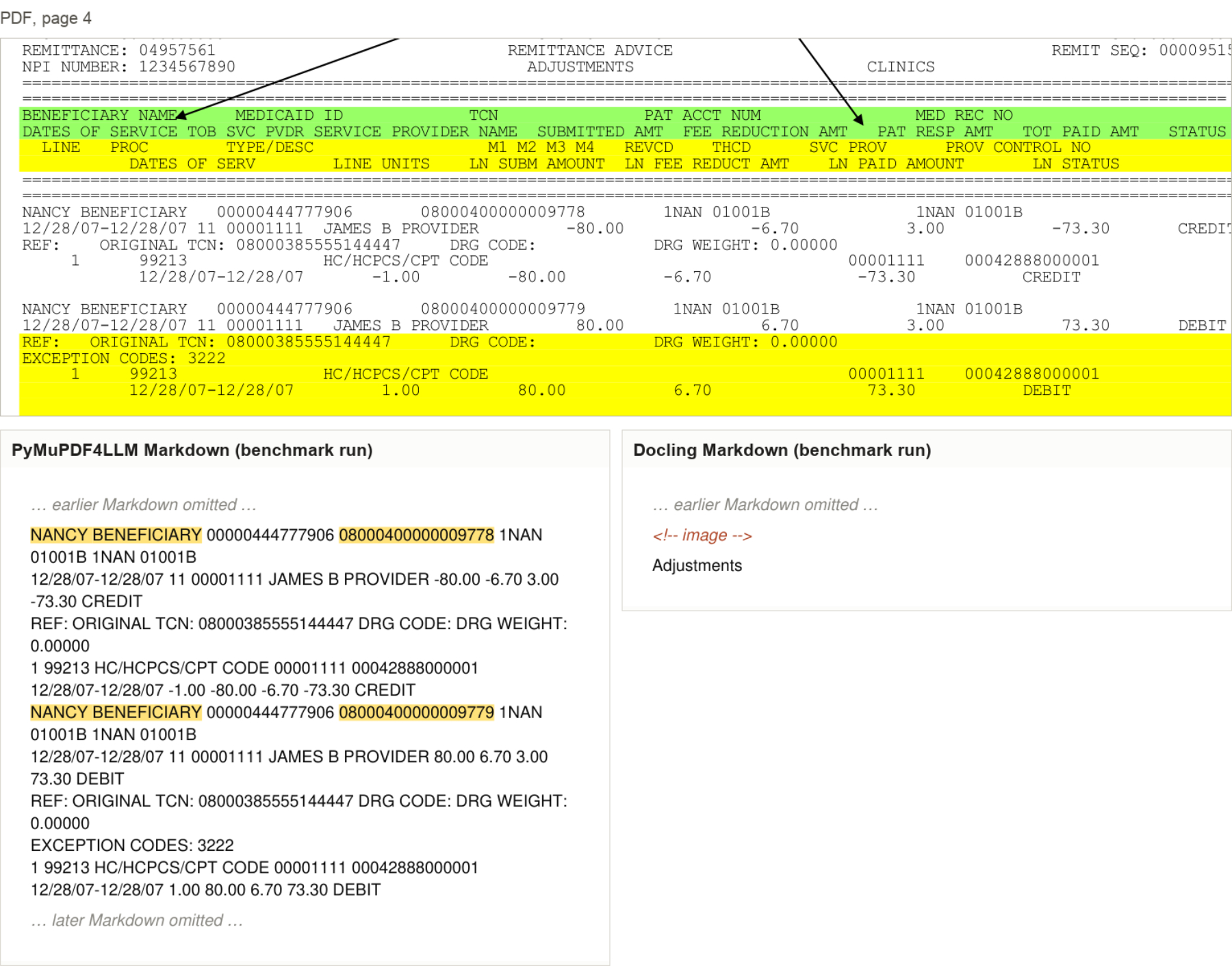
Figure 1: Medicaid remittance statement, adjustment page
In the remittance statement below, PyMuPDF's Markdown included every claim row. Docling returned only image placeholders. Across the remittance-statement category, average F1 was 87.7% for PyMuPDF and 4.6% for Docling.
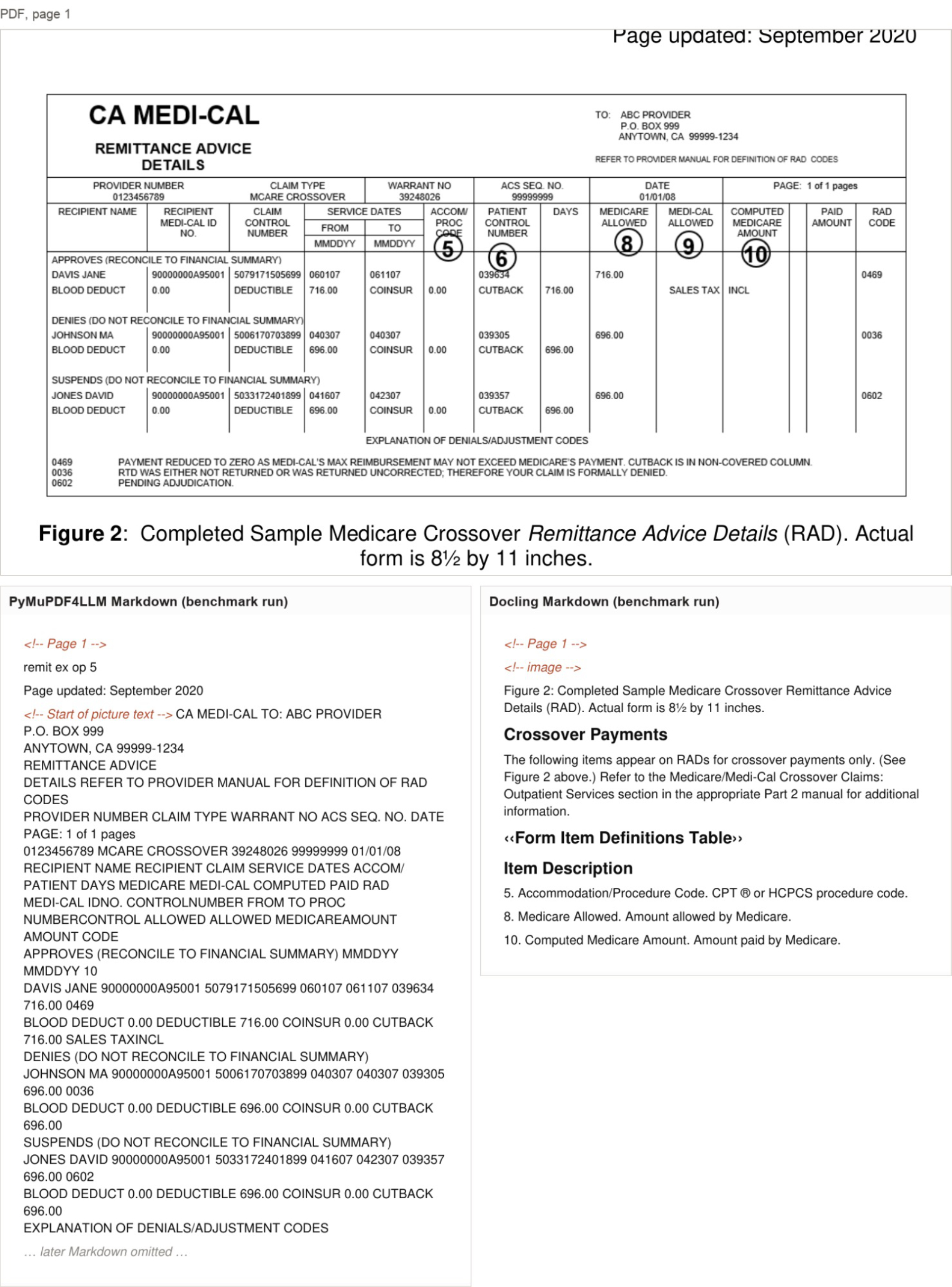
Figure 2: CA MEDI-CAL Remittance statement
In the scanned oil and gas operator certificate below, PyMuPDF used OCR to read the field names, lease information and addresses. Docling failed to convert 9 documents of this type and produced no Markdown.
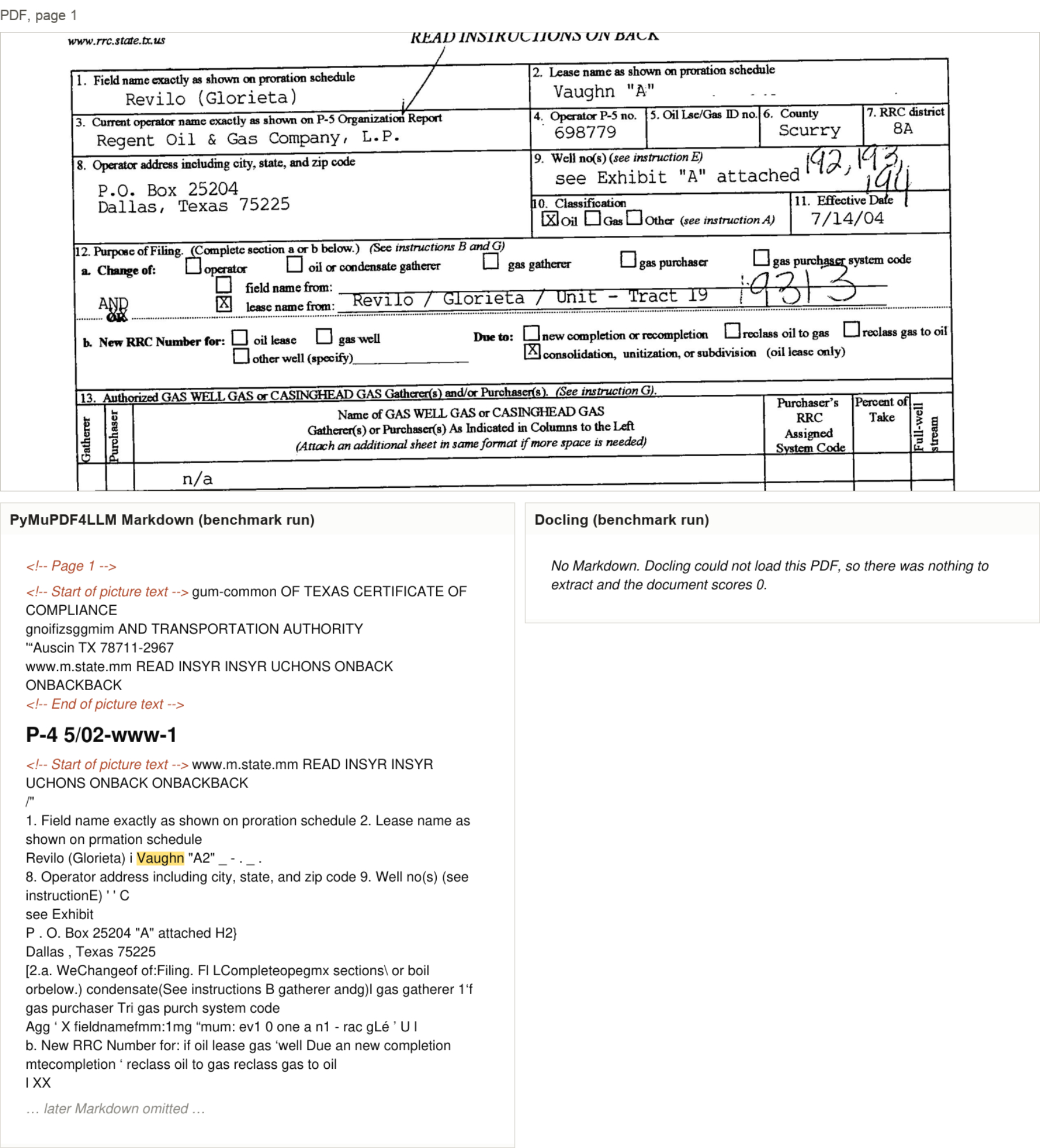
Figure 3: Oil and gas operator certificate
3. Finding an item table inside a complex form
In the purchase requisition below, PyMuPDF preserved every quantity and unit price in the item table, including the $39,360.00 total. Docling turned the upper form into one long table-header cell. It retained the item descriptions but lost all the amounts. F1: PyMuPDF 100, Docling 67.
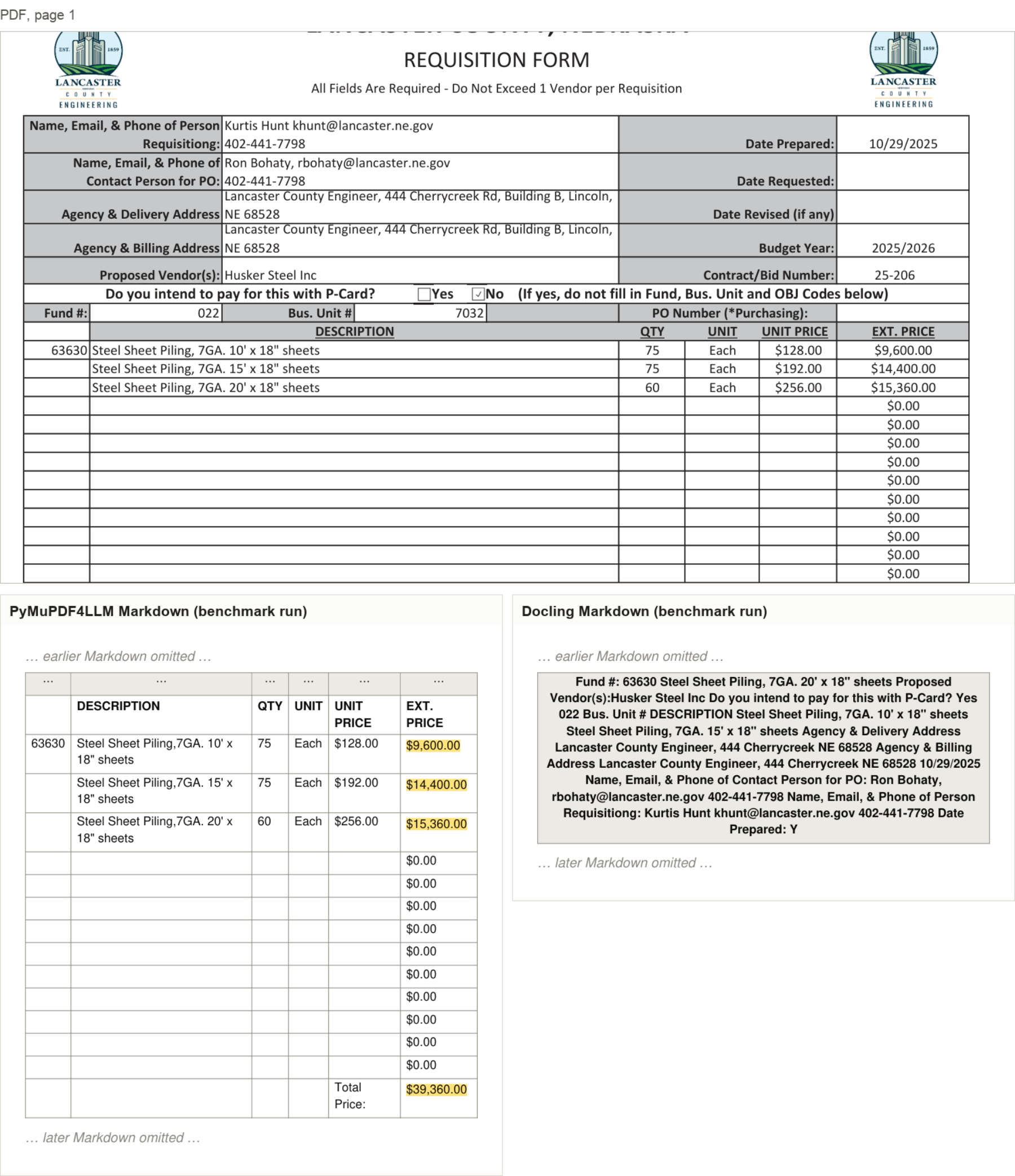
Figure 4: Purchase requisition
The same page was then tested in several forms: the original, rotation-corrected, fully rasterized, with the upper form removed, and with the footer removed. PyMuPDF preserved all 5 tracked items in every variation. Docling recovered the items only when the upper form was removed.
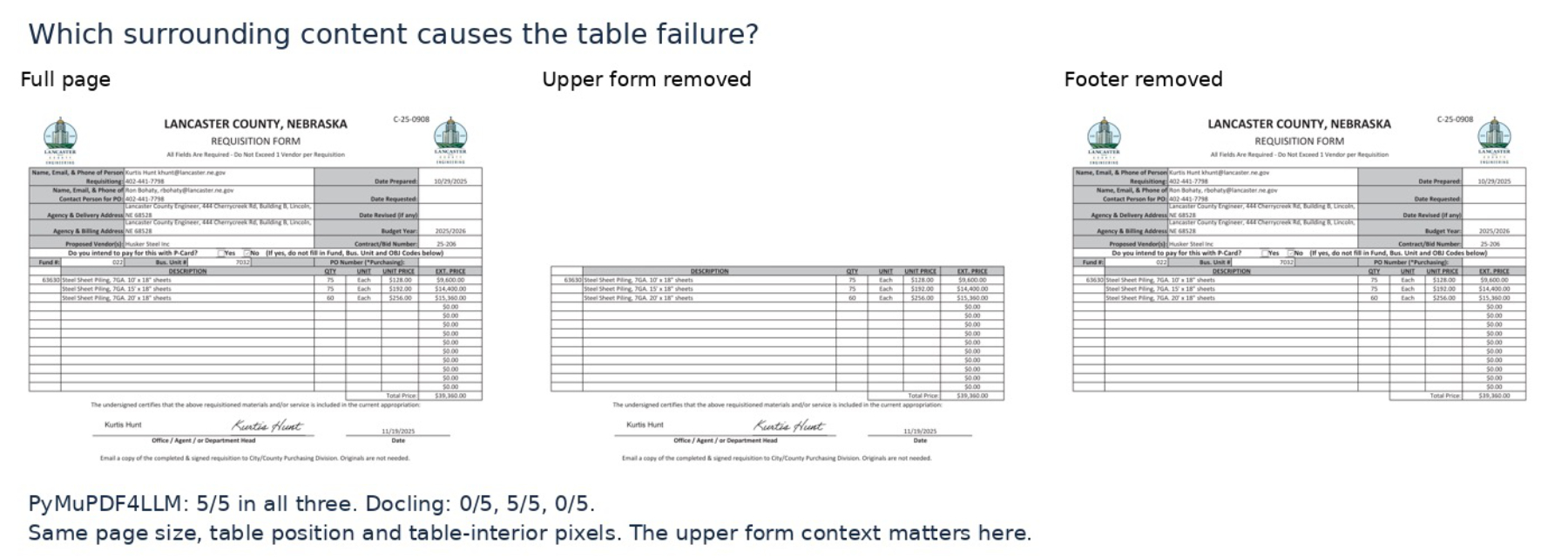
Figure 5: Purchase requisition layout updated, upper form removed
4. Preserving every digit
A missing digit can make an amount or identifier unusable. The analysis counted 444 such errors with direct PDF input and 32 with PyMuPDF. In the examples below, PyMuPDF supplied the original digits as text for the LLM to extract.
In the W-2 wage statement below, the LLM extracted all four amounts correctly from PyMuPDF's Markdown output. With direct PDF input, it dropped repeated digits, reading 107615.66 as 10715.66 and 6672.17 as 667.17.
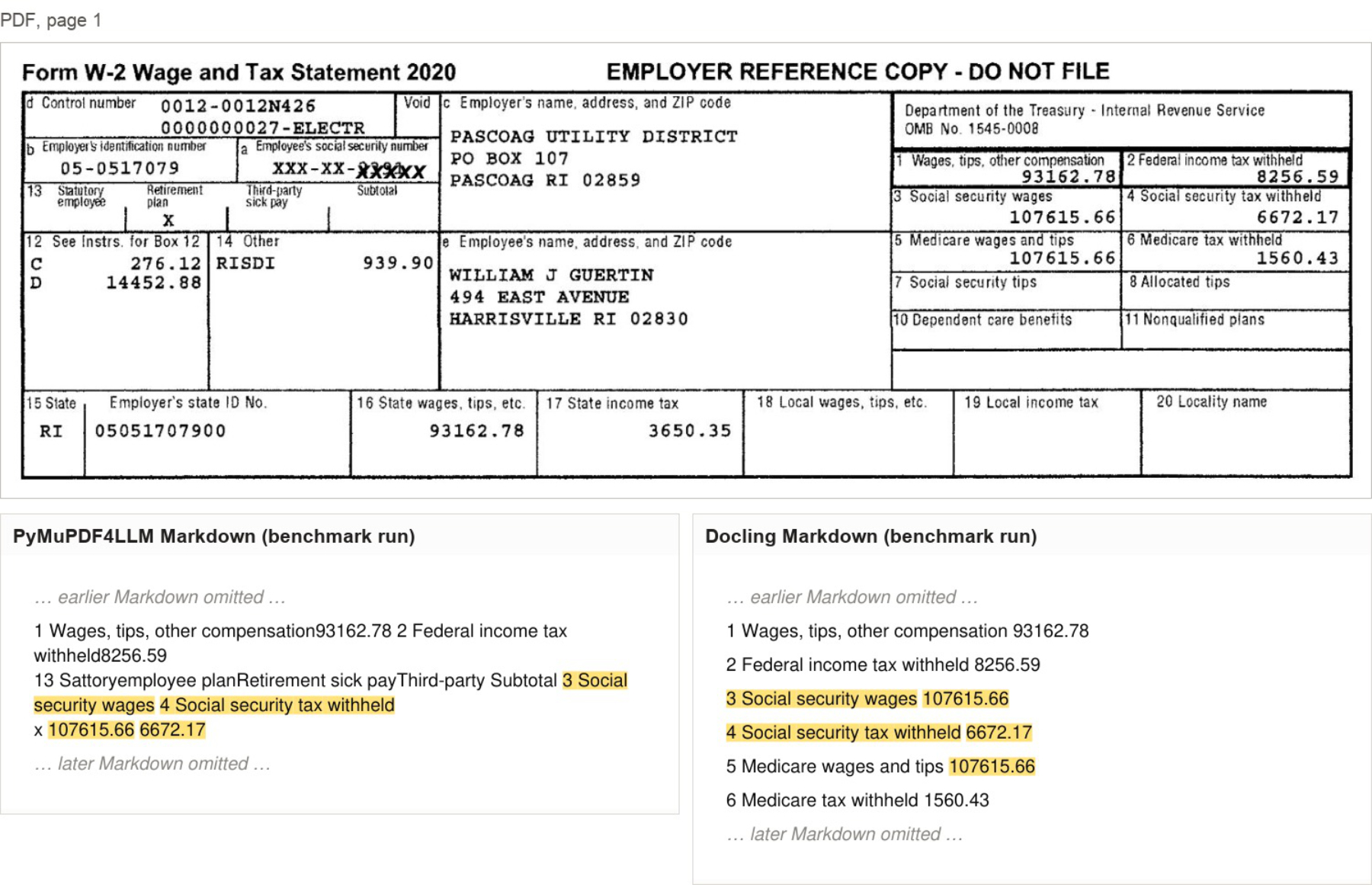
Figure 6: W-2 wage statement
With the scanned import entry below Direct PDF input dropped one digit from each of the entry number, B/L number and manufacturer ID. By contrast PyMuPDF preserved every digit.
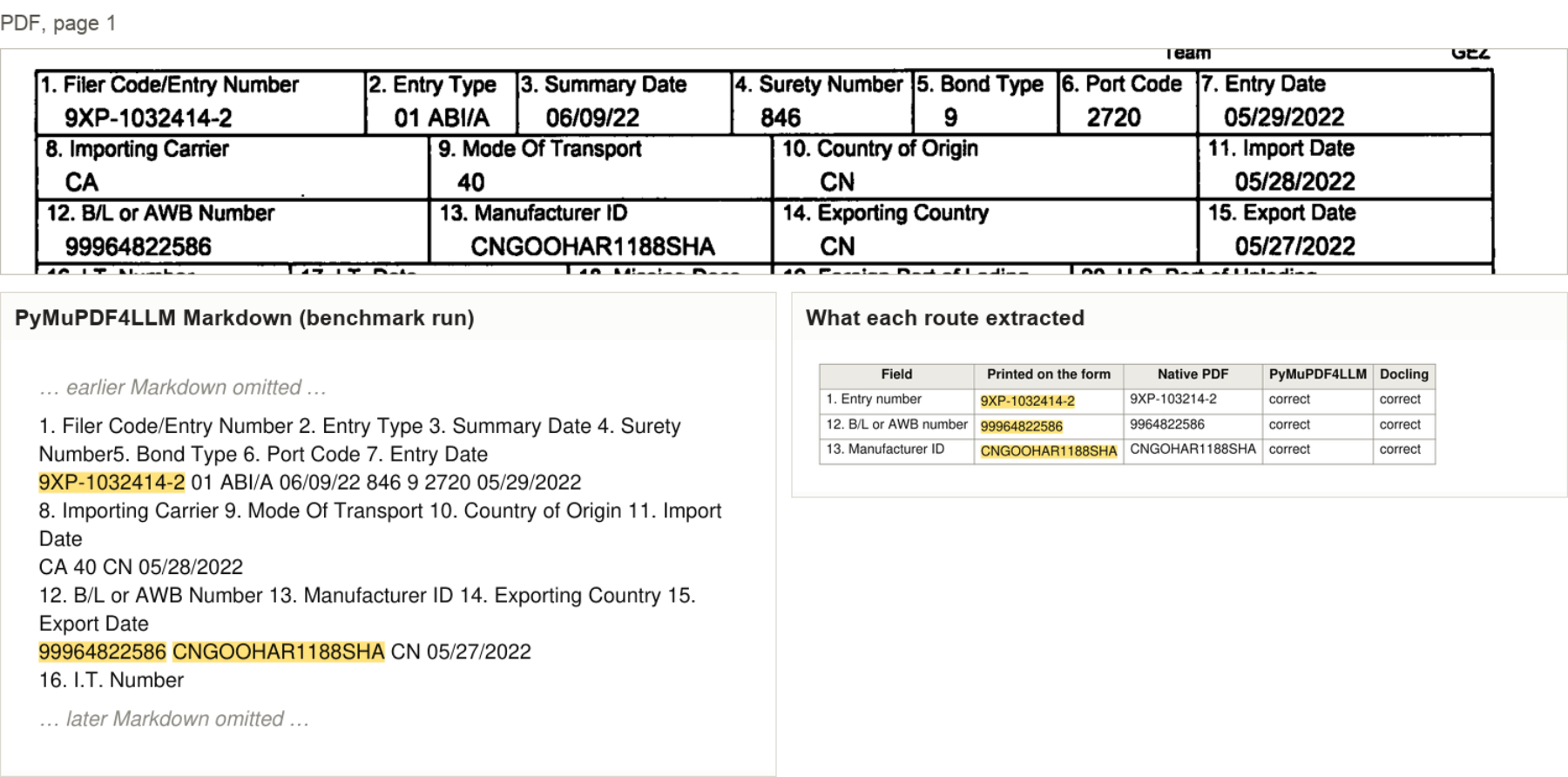
Figure 7: Scanned import entry
The overall F1 scoring for this sample is as follows:
- PyMuPDF 95%
- Direct PDF 89%
- Docling 81%
5. Keeping labels and values together
In a random sample of 198 values, 70% appeared cleanly beside their labels in PyMuPDF's output, compared with 54% in Docling's. In the tax-return sample, labels and values were separated in 6 of 50 cases for PyMuPDF and 33 of 50 for Docling.
In the tax return sample below, PyMuPDF kept the amounts on lines 11, 12a and 12c beside their descriptions, and the LLM correctly extracted every line from 9 to 15. Docling disrupted the row order: the amount for line 14 appeared before line 15, while its description appeared after line 15. The LLM also extracted line 12c incorrectly.
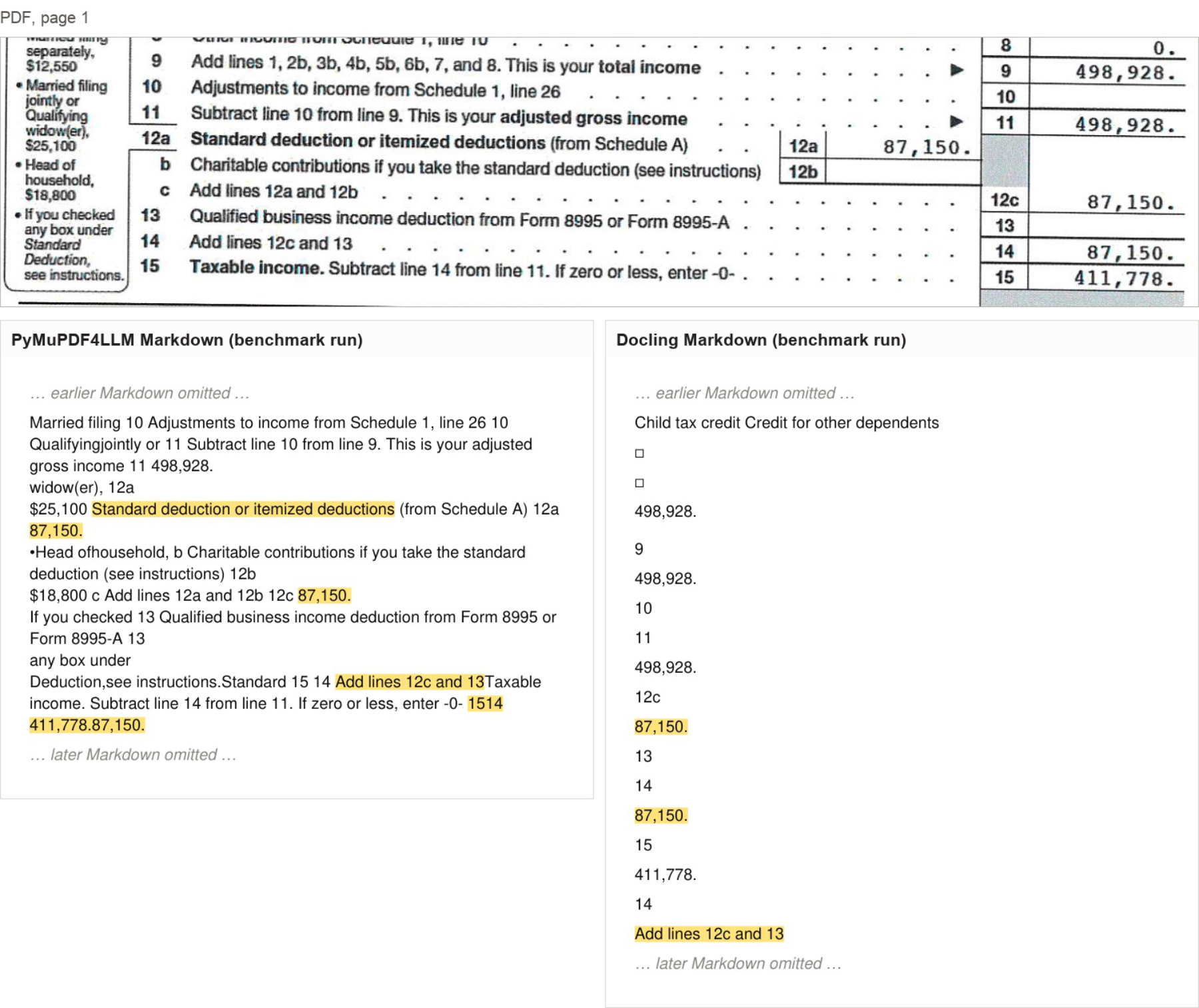
Figure 8: Tax return sample
In the well pressure test report below, PyMuPDF's table kept each value next to its label, and the LLM extracted all four items correctly. Docling listed “Lease,” “Well No.” and the test date separately from their values, consequently, from this input, the LLM swapped the lease and well numbers and assigned the test date to the wrong field.
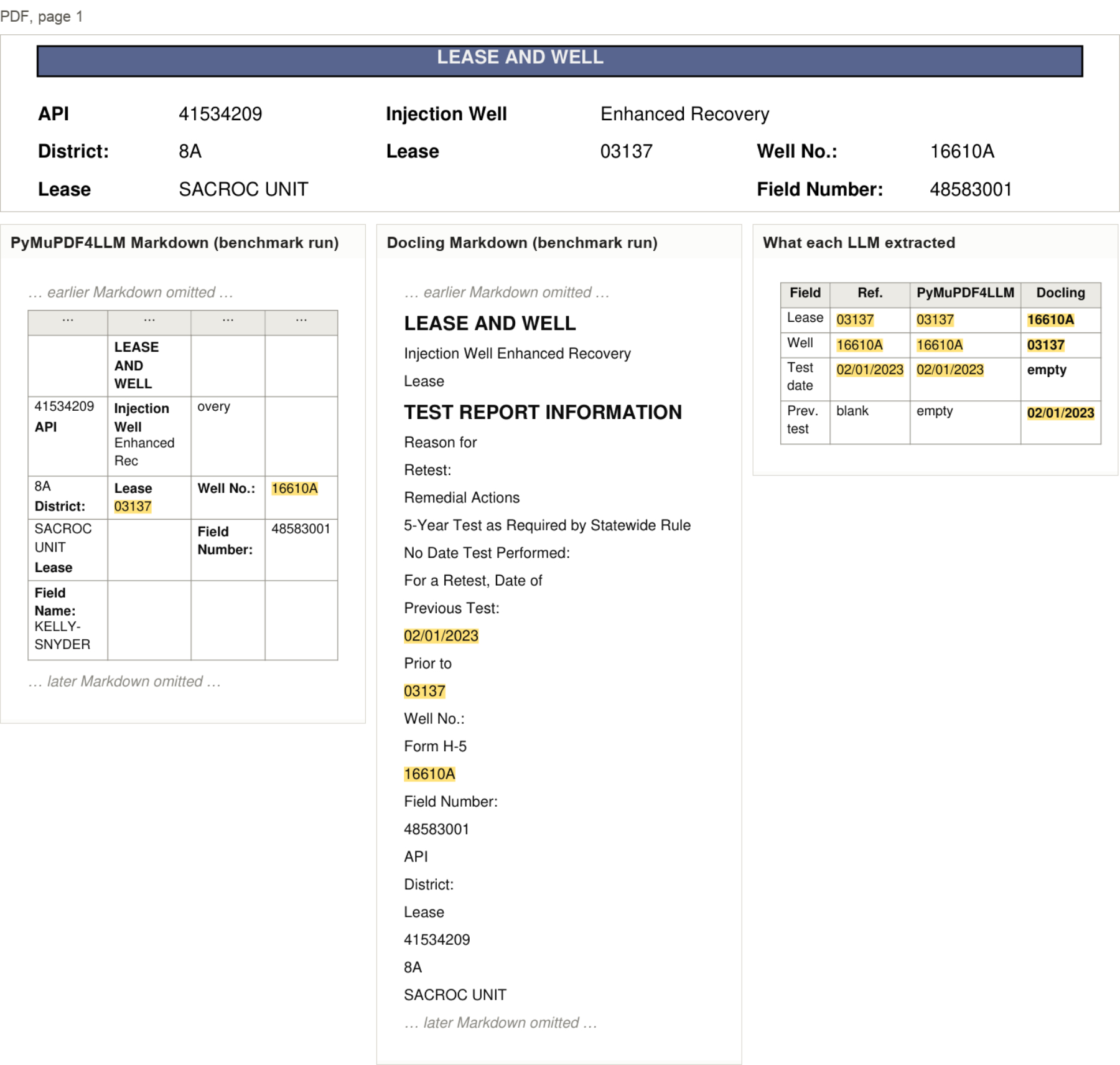
Figure 9: Well pressure test report
6. Retaining headers, footers and footnotes
Extraction schemas may ask for information outside the main body, such as document titles, printed page numbers and definitions. PyMuPDF retained that text in the following examples:
6.1 Datasheet
The document title appears in the page header. PyMuPDF retained it. Docling omitted the header and began at “5 Specifications”.
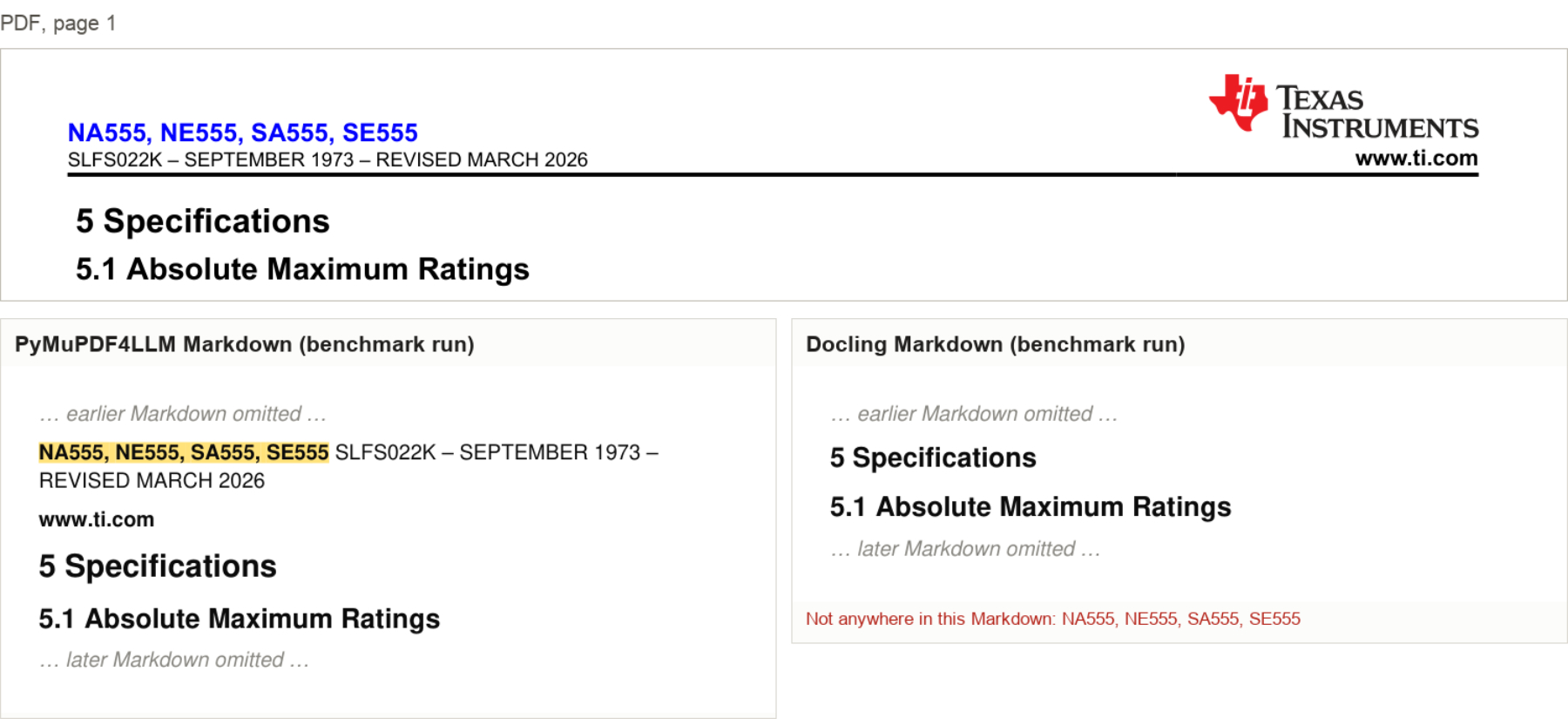
Figure 10: Datasheet
6.2 Deviation report
A 25 page report. The schema asks for each item's printed page number. PyMuPDF retained “Page 17 of 25”. Docling omitted the footers on every page.
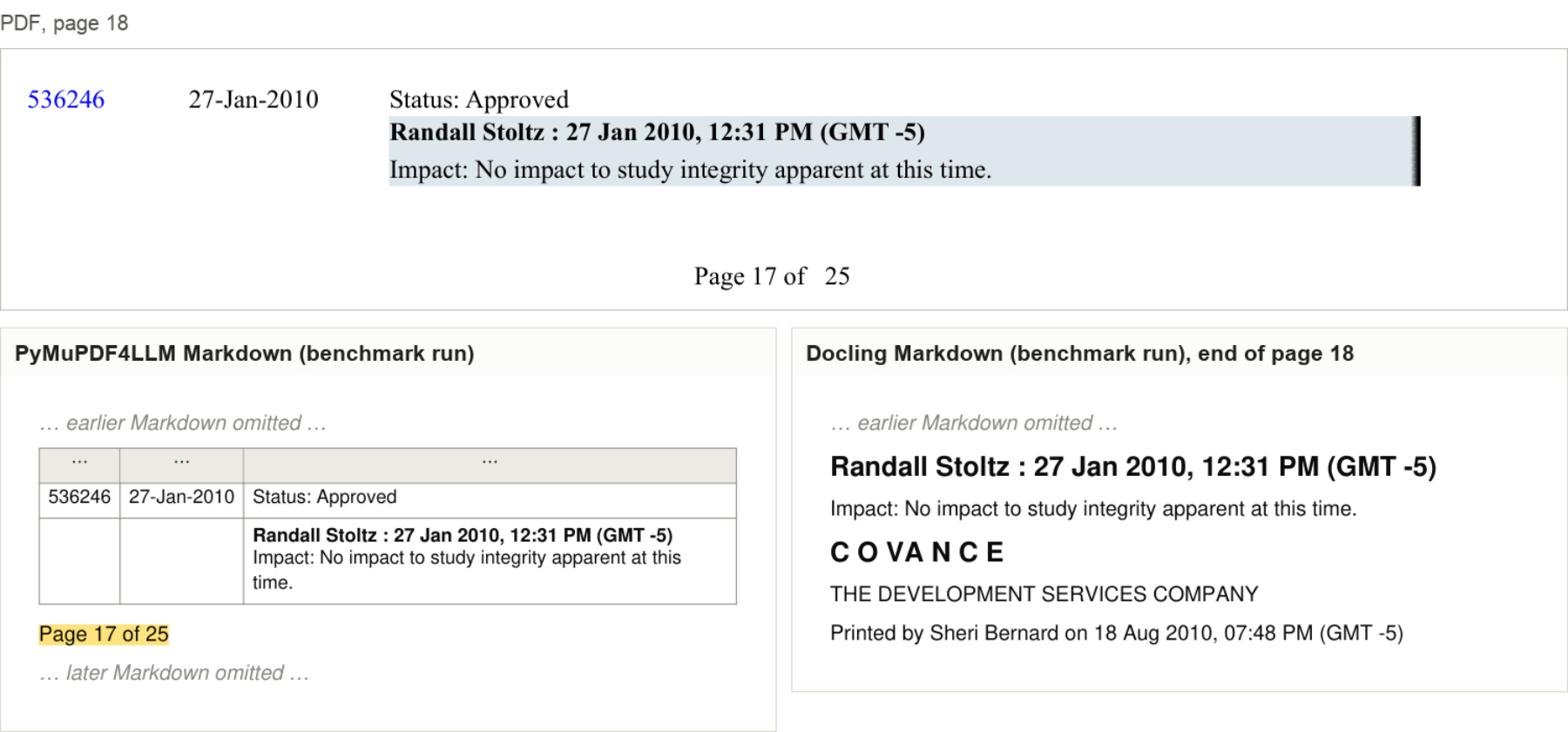
Figure 11: Deviation report
6.3 Clinical data listing
A footnote below the table defines “Study Day”. PyMuPDF retained it. Docling omitted it under every export setting tested.
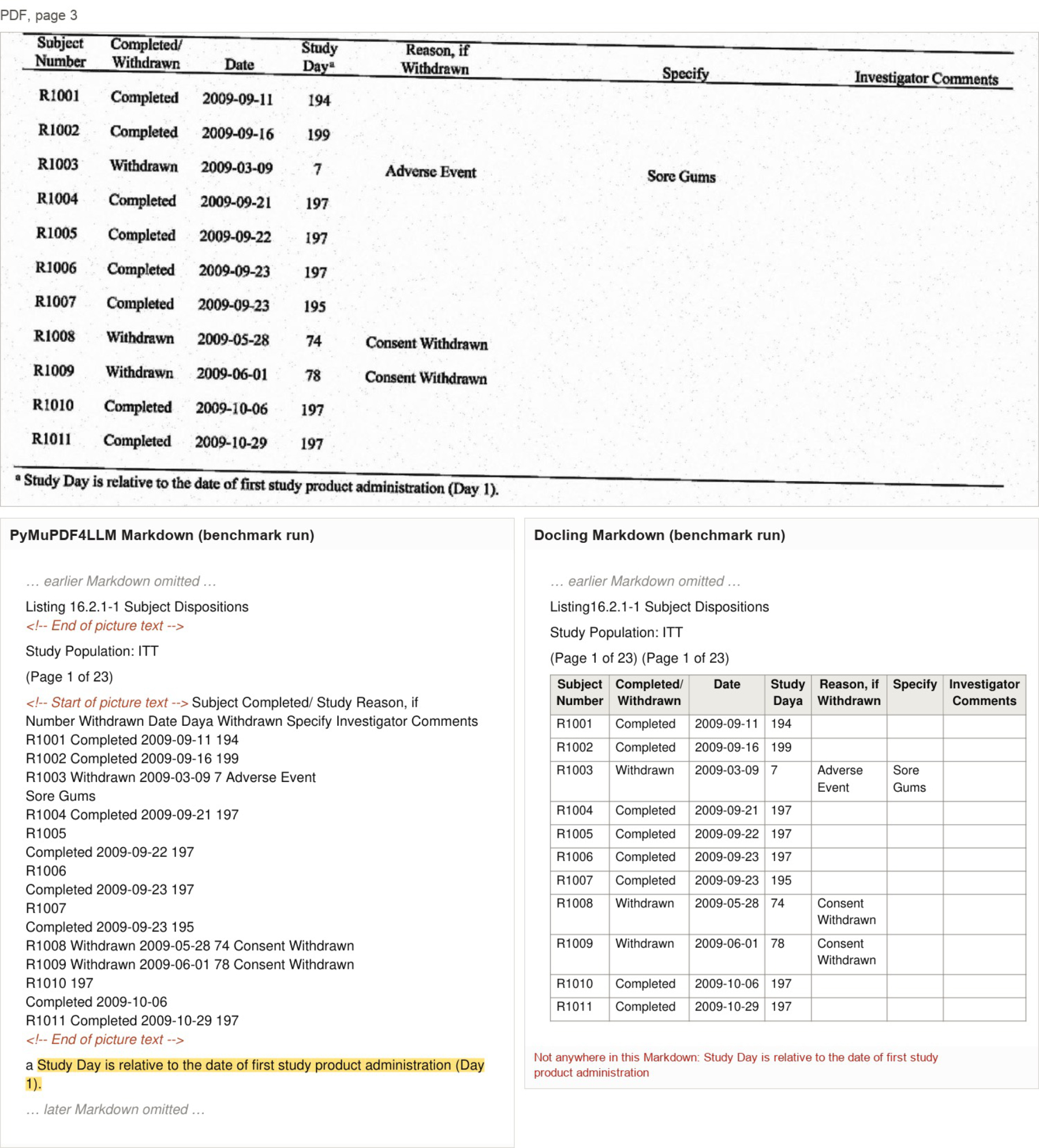
Figure 12: Clinical data listing
7. Preserving exact wording in a court filing
PyMuPDF preserved the original punctuation, including curly quotation marks (“ ” and ’). In all 47 digitally generated documents containing curly quotation marks, Docling changed them to straight quotes and changed double quotation marks to single ones.
In a court filing document with 208 factual statements the LLM extracted all 208 correctly from PyMuPDF's output. With Docling, 92 differed from the expected text, including 51 where only the quotation marks differed. This matters when legal or regulatory work requires exact quotations.
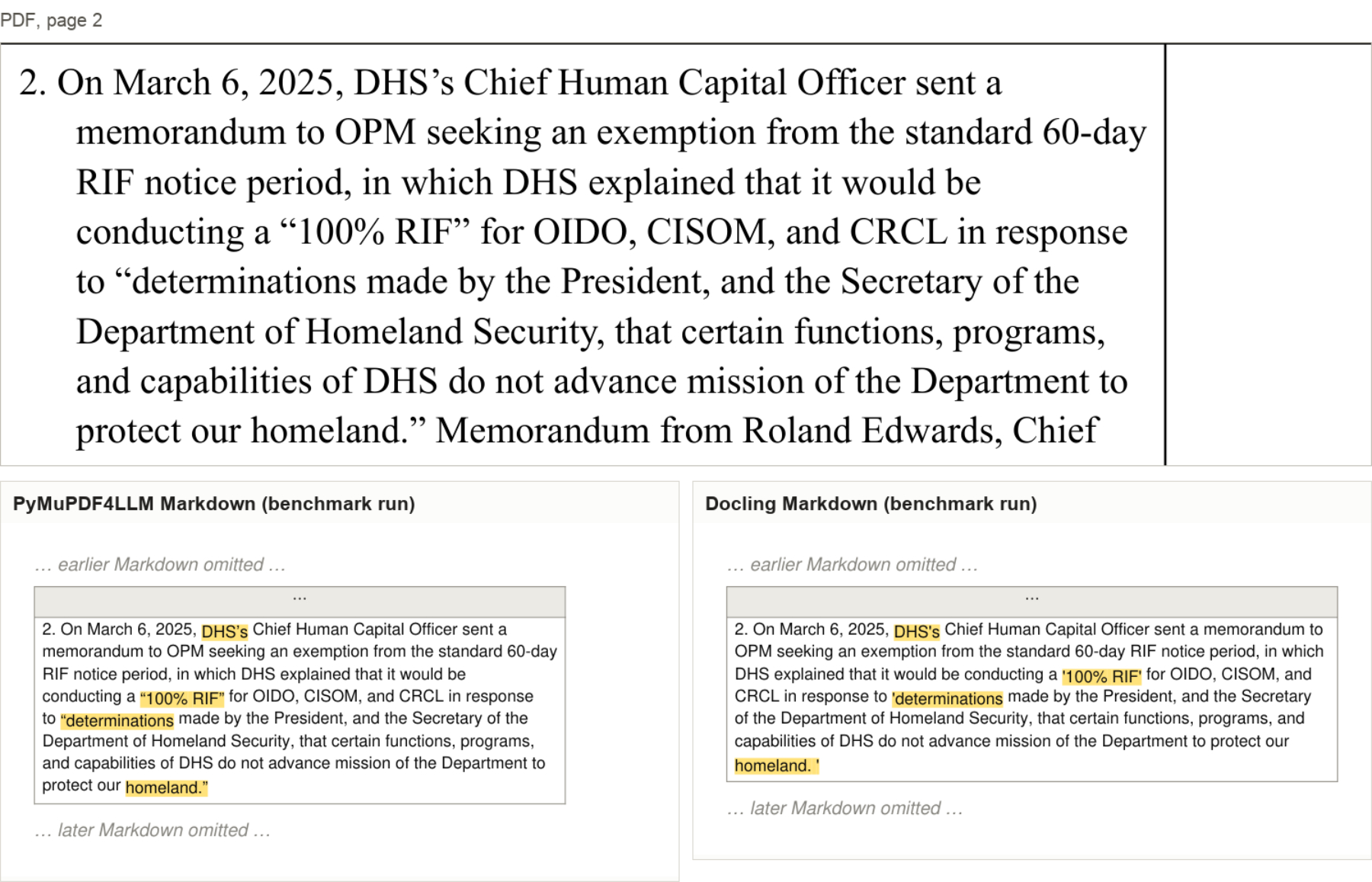
Figure 13: Court filing sample
The overall F1 scoring for this sample is as follows:
- PyMuPDF 100%
- Direct PDF 100%
- Docling 85%
8. Retaining numbers when a chart is added
A bar chart was added to a page containing four regional figures. Once the chart was present, Docling classified the entire region as an image and retained none of the four numbers. PyMuPDF retained all four in both versions of the page. This controlled example shows how chart detection can affect otherwise readable numbers.
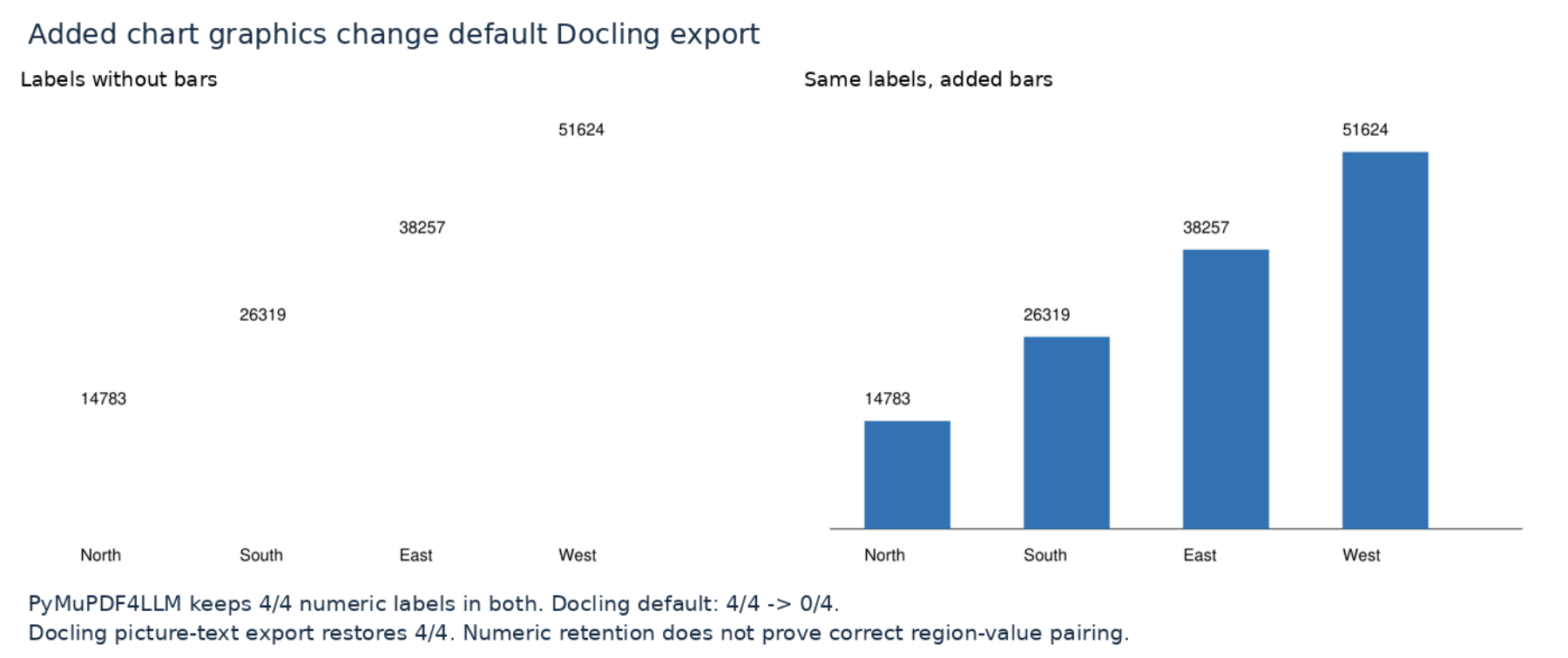
Figure 14: Bar chart sample
F1 Explained
An extraction F1 scores how accurately a tool pulls content from a PDF by comparing its output to a hand-checked ground truth. It combines precision (how much of what was extracted is correct) and recall (how much of what should have been extracted was actually found) into a single number.